Table of Contents
- Use Standard Odoo Variants & Attributes
- Limitations of Standard Odoo Product Configurator
- Manage Complex Product Configuration with Odoo CPQ
- Which Product Configuration Method Is Right for Your Business- Standard Configurator vs. CPQ App?
An expertise-backed guide to managing complex product configuration in Odoo — how each works, what it genuinely cannot do, and when each approach breaks down in practice.
Manage Complex Product Configuration in Odoo
Use Standard Odoo Variants & Attributes
This is the core of Odoo’s configuration system.
Attributes (Color, Size, Material) are defined globally or per-product. Each attribute has discrete values (Red, Blue / S, M, L). Every valid combination of values produces a distinct product variant- a unique database record with its own inventory count, barcode, cost, and sales records.
This means, a T-shirt with 4 colors × 5 sizes generates exactly 20 independent variants.
Display Types
Attributes can render as Pills (selectable buttons), Color swatches (HTML hex), Radio buttons, Select dropdowns, or Multi-checkbox. Display Type affects the Product Configurator, POS dashboard, and eCommerce storefront independently.

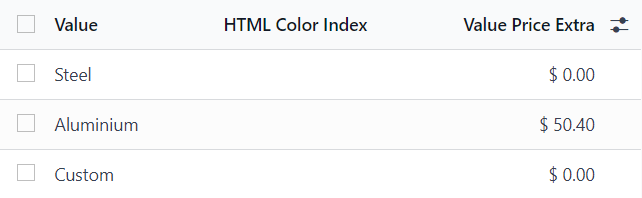
Attribute Value Price
Each attribute value can carry a fixed price surcharge added to the base price. These are visible in the Product Configurator at the moment of selection on a quotation, making per-option pricing clear to the salesperson.
Exclusion Rules (“Exclude for”)
Each variant value has an “Exclude for” field to block specific value combinations (e.g., “White” unavailable in “XXL”). Odoo marks excluded combinations as unavailable in eCommerce. This is the only native compatibility constraint mechanism in the variant layer.
Variant-Level Data
Each variant stores its own: barcode/SKU, internal reference, cost, sales price, weight, and product images, fully independent from sibling variants. All downstream apps treat each variant as a distinct product.
Variant Creation Modes
The Variant Creation Mode is the most architecturally significant attribute setting. It is set per attribute and, critically, cannot be edited once the attribute is used on any product. Choosing the wrong mode requires deleting the attribute and rebuilding from scratch.
| Mode | Behaviour | POS | Best Fit |
| Instantly | All variants created immediately when attributes are added to the product template. Every combination exists as a record from day one. | Yes | Fixed catalogues with ≤ 3 attributes; all combinations valid and stocked |
| Dynamically | Variant records are only created when added to an actual sales order. Large option spaces remain manageable in the database. | No — products vanish from POS | Large option spaces where most combinations are never ordered |
| Never (option) | No discrete variant records created. Attributes are informational only. Required for the Multi-checkbox display type to function correctly. | Limited | Free-text customisations, engravings, personalised notes |
Limitations of Standard Odoo Product Configurator
When Variants Multiply Uncontrollably standard Odoo breaks
Odoo generates variants as a Cartesian product of all attribute values. Five attributes with five values each produces 3,125 variants. Community reports and GitHub issues confirm measurable performance degradation on the screen beyond approximately 1,000 variants per template. Large imports (8,000+ variants) can take hours to process.
How to Manage Variant Explosion in Odoo?
No Compatibility Rules Engine in Odoo Quote Calculator
All attributes are presented simultaneously. There is no native “show attribute B only if attribute A = X” step-by-step guided flow. Conditional logic between attributes is absent from the standard configurator.
Standard Odoo Configuration flow Stops at Procurement
The Product Configurator is available on Sales orders, POS, and eCommerce. It is not included natively on Purchase Orders. Third-party or custom modules are required for configurable-product purchasing workflows with vendors.
Can’t Select Multiple Variants at a Time
The Product Configurator adds one variant per interaction. For multi-variant orders, the salesperson must reopen it for each variant. Order Grid Entry resolves this for 2-attribute matrices only with three or more attributes, the grid becomes impractical.
Can’t set Min / max / default Quantities Per Component
Manage Complex Product Configuration with Odoo CPQ
When variant matrices become too large to manage, pricing depends on engineering parameters, or sales teams need guided constraint-based selection flows, CPQ is the correct architectural response. It operates above and independently of the variant layer.
Suggested: What is CPQ in Odoo?
Configuring Product in Odoo CPQ
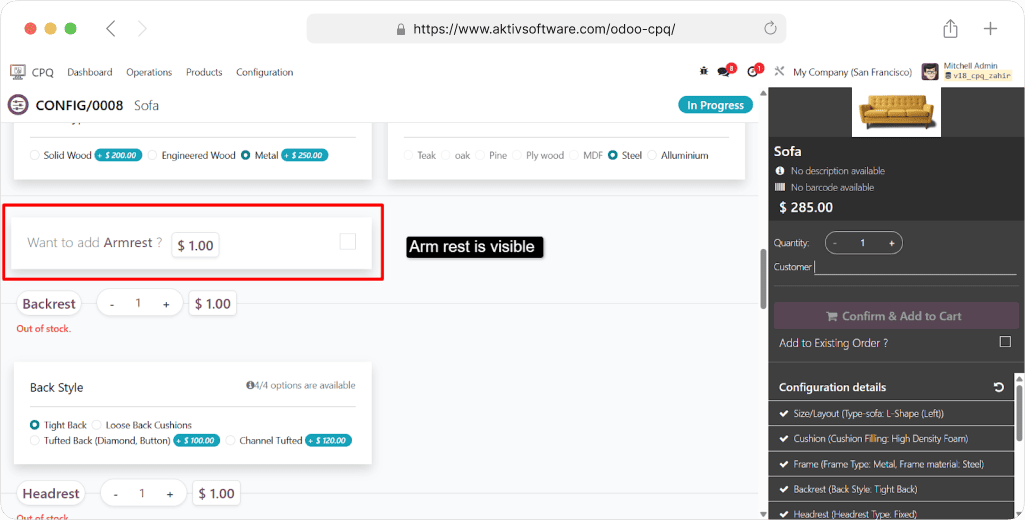
Step-by-step product configuration screen dynamically show or hide the next step based on prior answers. Non-technical sales reps can quote highly complex products without engineering involvement on each deal.
Constraint-based configuration with smart compatibility rules, mandatory options, and guided step-by-step question flows. Invalid combinations are blocked proactively, not merely hidden after the fact using attribute exclusions.
Rules spanning multiple attributes: “if Motor = 3-phase AND Voltage = 110V, then Starter = Soft-Start (mandatory).”
The cross-attribute dependency logic that the native variant layer fundamentally cannot express.
Dynamic Price Calculation in Odoo CPQ
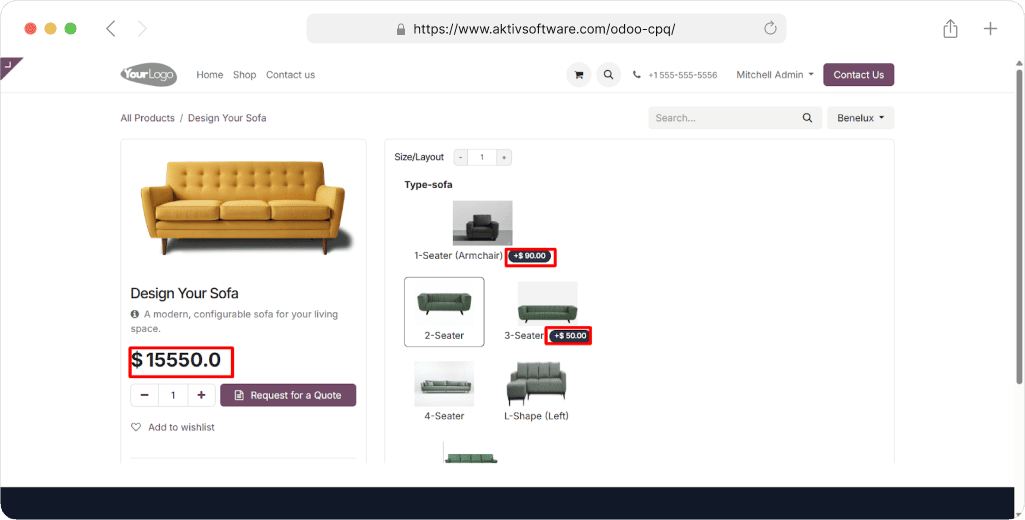
Pricing in Odoo CPQ is an output of the configuration, computed from dimensions, quantities, material costs, and customer tier simultaneously.
When a configured price falls below defined margin thresholds or requires an exception discount, CPQ automatically triggers a manager approval chain before the quote can be sent, no separate workaround needed.
Quote & BoM Generation from Configuration
Branded, multi-option proposals generated directly from the configuration output.
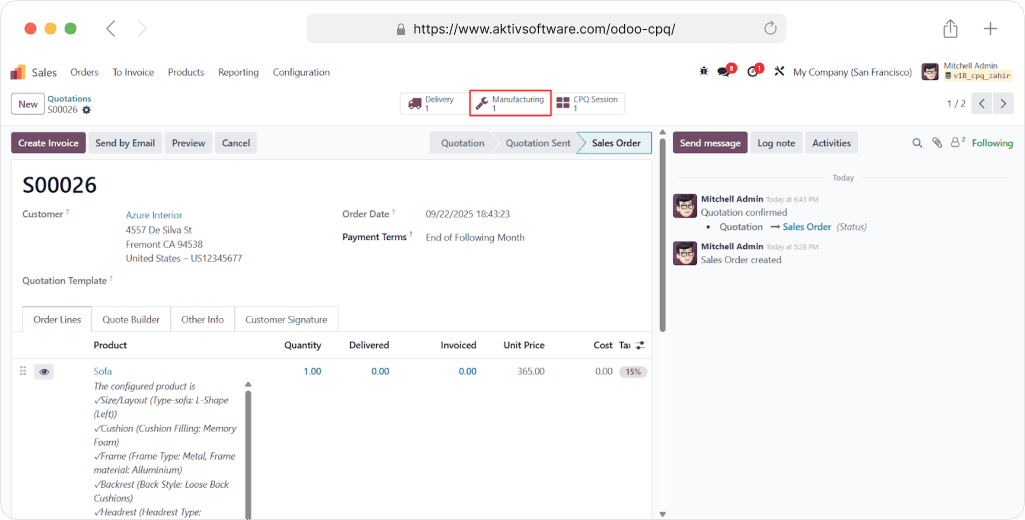
CPQ output drives the correct variant BoM components and work center routing. Manufacturing receives exact build specifications from the moment the sale is confirmed, no manual translation from quote to shop floor.
CPQ can generate and resolve configurations without requiring pre-existing product variant records in the database, directly overcoming the single biggest scalability constraint of the native variant system.
Understand Odoo CPQ better>> Watch Video
Which Product Configuration Method Is Right for Your Business- Standard Configurator vs. CPQ App?
|
Business Scenario |
Standard Product ATTRIBUTES & VARIANTS |
CPQ App |
|
Retail & Consumer Goods |
||
| Apparel– Color & Size variants | ✓ Standard Variants (Instantly) + Order Grid Entry. Color × Size matrix is exactly what the variant system was designed for. Pricelists handle wholesale tiers. |
Not needed unless attribute count or seasonal SKU expansion pushes the template beyond ~800 variants. |
| Consumer electronics — pre-defined specs | ✓ Standard Variants (Instantly) + Product Configurator. Storage, colour, and connectivity variants are finite and well-defined. Attribute exclusions handle unavailable combinations (e.g., no Rose Gold in 1 TB). |
Not needed for pre-defined SKU catalogues. CPQ only applies if customers can configure custom hardware builds with interdependent specs. |
| Custom furniture / personalised goods | Partially Standard works for pre-defined fabric/finish/size combinations. The “Never” attribute mode handles engravings or personalised text as informational options without creating stock variants. |
✓ CPQ needed when: Dimensions are customer-specified (width × height × depth), pricing is formula-driven from area/volume, and material combinations have engineering constraints (frame type must match leg style). |
|
Manufacturing & Industrial |
||
| Make-to-stock with variant BoMs | ✓ Standard Variants (Instantly) + Variant BoM. Attribute-conditional components cover most make-to-stock scenarios. One BoM with variant-conditioned component lines handles all configurations without separate BoMs per variant. |
Not required as long as component quantities are fixed and the attribute matrix remains manageable. |
| Engineer-to-order (ETO) equipment | Standard variants cannot handle ETO. No formula-based component quantities, no cross-attribute engineering constraints, and no guided selling flow for non-technical reps quoting complex machinery. | ✓ CPQ required Constraint rules enforce valid motor/voltage/starter combinations. Formula pricing calculates cost from power rating, certification type, and fabrication hours. BoM components are generated automatically from the CPQ output. |
| Packaging / print with variable dimensions | Standard covers pre-defined sizes. Cannot handle open-ended customer-specified dimensions (e.g., W × H × D in mm) as inputs to pricing or component quantity calculations. | ✓ CPQ required Formula pricing calculates cost from customer-provided dimensions. Material quantities (paper, adhesive, ink coverage) are computed via expressions — impossible in the standard variant BoM where quantities are fixed. |
|
IT, Software & Managed Services |
||
| Hardware + service bundles | ✓ Standard Kit BoMs bundle hardware + services into a single sales line. Optional Products handle structured upsell (extended warranty, setup service). Fixed-tier subscription plans work well as standard products or variants. |
Not needed for fixed-tier bundles with pre-defined components. |
| SaaS / cloud with user-count pricing | Standard pricelists can handle fixed quantity tiers (1–10 users = X, 11–50 = Y). Breaks down when price is a continuous formula (e.g., per-user rate changes non-linearly with volume or module selection). | ✓ CPQ needed when: Pricing depends on user count × selected modules × contract term simultaneously. CPQ formula expressions compute the price dynamically; approval workflows trigger when discount thresholds are breached. |
| Managed services with conditional SLAs | Standard optional products can present SLA tiers, but cannot enforce “if response time = 1hr, then on-site coverage is mandatory” type dependency rules between service options. | ✓ CPQ required Guided selling questionnaire walks the rep through support scope, response time, and coverage model. Constraint rules automatically enforce valid SLA combinations; incompatible options are blocked before selection. |
|
Distribution & Wholesale |
||
| Multi-variant wholesale orders | ✓ Standard Order Grid Entry is built for this. Distributors enter quantities across the full Color × Size matrix in one interaction. Pricelists handle volume breaks and partner-tier discounts automatically. |
Not needed unless pricing involves complex conditional formulas beyond standard quantity-break tiers. |
| Trade kits & solution bundles | ✓ Standard Kit BoMs handle fixed-component trade kits cleanly. The kit appears as one line on the distributor’s order; component breakdown is visible on the delivery and invoice only. |
CPQ adds value only if kit contents vary by customer selection or if solution configuration requires compatibility enforcement across components. |
|
Construction, Infrastructure & Projects |
||
| Project-based services (fixed scope) | ✓ Standard Fixed-scope service products with pricelists and optional add-ons cover most project quoting needs. No variant logic needed — scope is defined per quotation manually. |
Not needed unless scope selection is configuration-driven (e.g., selected project type automatically determines required tasks and material takeoffs). |
| Configurable infrastructure (telecom, MEP, solar) | Standard variants cannot handle site-specific sizing, regulatory compliance constraints, or pricing that responds to capacity calculations (e.g., kWp × panel area × installation type). | ✓ CPQ required CPQ guides reps through site parameters, load requirements, and compliance specs. Formula pricing computes system cost from capacity, component count, and installation complexity. Constraints ensure only compliant configurations are quotable. |
|
Automotive & Speciality |
||
| Vehicle / equipment configurator | Standard variants collapse under the attribute count- a commercial vehicle with chassis, engine, cab style, transmission, axle, paint, and accessories creates thousands of combinations. Exclusion rules cannot express the full compatibility matrix. | ✓ CPQ required Full constraint-based configurator with hundreds of compatibility rules. Formula pricing calculates list price and dealer margins in real time. Multi-option proposals let the buyer compare trim levels. BoM output generates exact build spec for production. |
| Spare parts with known variant structure | ✓ Standard Variants (Dynamically or Instantly depending on catalogue size) + Order Grid Entry. Parts catalogues typically have structured, finite attribute matrices — compatible with the standard variant system. |
Not needed unless cross-part compatibility enforcement or formula-based pricing (e.g., price per weight class) is required. |
TL; DR
Use Standard Configurator or Quote Calculator in Odoo When-
- Product options are finite, predictable, and map to a defined attribute matrix
- Pricing is attribute-extra-based or pricelist-driven — not formula-computed
- All or most attribute combinations are valid (few exclusion rules needed)
- Variant count per product template stays below ~500–800
- Sales reps can select the right variant without guided question flows
Use Custom Odoo CPQ App When-
- Options have interdependencies, selecting one attribute constrains valid choices in another
- Pricing is computed from engineering parameters, dimensions, or multi-attribute formulas
- Sales reps routinely make configuration errors without a guided flow
- Attribute count would create an unmanageable variant matrix (hundreds of rules)
- Margin control and approval workflows are needed before a quote can be sent
Not sure which configuration layer fits your product range? Let’s audit your catalogue before you build on the wrong foundation.
Schedule Free Consultation Call.