
In Odoo Parametric CPQ, every characteristic on a product template is assigned one of six field types, Integer, Float, Dropdown, Boolean, Text, or Auto, and the right choice depends on how the value is entered and used.
Pick wrong and you either limit what the configurator can do or add complexity you did not need. This guide covers when each type is the right call.
If you are building parametric product configuration, this is one of the first decisions you make on every attribute, and getting it right the first time saves reworking rules and formulas later.
Quick Reference: The Six Characteristic Types in Odoo CPQ
| Field type | Use it for | Entered by | Example |
| Integer | Whole-number counts | Buyer types a number | No. of shutters, no. of panels |
| Float | Continuous measurements | Buyer types a number | Width, weight capacity, cushion thickness |
| Dropdown | A bounded, named set of choices | Buyer selects | Finish, frame material, warranty period |
| Boolean | A genuine yes/no decision | Buyer toggles | Includes lumbar support |
| Text | Free-form input, not calculated | Buyer types text | Custom engraving message |
| Auto | A value derived from other fields | Not entered, computed | A formula-driven result |
The rule of thumb: if the buyer types a number, use Integer or Float. If they pick from a named list, use Dropdown. If it is yes or no, use Boolean. If it is free text, use Text. If the value should be calculated, never typed, use Auto.
When Should You Use Integer vs Float?
Use Integer for whole-number counts and Float for continuous measurements. Integer suits things like the number of shutters or panels; Float suits width, weight capacity, or cushion thickness, values that can take any point on a range.
The distinction matters for validation and for how the value behaves in downstream compute expressions. Mixing them up rarely breaks anything outright, but an Integer where a Float belongs can create rounding surprises in formulas that expect a whole number.
Both types accept free-text numeric entry, which is the right choice when the valid range is wide and continuous rather than a short discrete list.

When Should You Use a Dropdown?
Use a dropdown for anything with a manageable, named set of valid options, like finish, frame material, or warranty period. It is the workhorse type in parametric configuration, and each dropdown value can carry its own code, price, and cost.
Dropdowns are also what compatibility rules most commonly target, because a rule condition usually checks whether a dropdown equals a specific value. So if an attribute is going to drive rules, a dropdown is almost always the right home for it.
How a dropdown renders is controlled by its display_type setting, radio, pills, or select. Pills and radio buttons work well for a handful of visually distinct options like armrest type, while a standard select dropdown suits longer lists such as a wattage range.
When Should You Use Boolean or Text?
Use Boolean for a genuine yes/no decision, and Text for free-form input the system does not need to calculate against.
Boolean renders as a simple two-button toggle rather than a dropdown, which keeps the interface honest about what is actually being asked, for example, “includes lumbar support.” Text covers input like a customer’s custom engraving message, where the value is captured but never used in a formula.
What Is the Auto Type, and When Should You Use It?
Auto is the type whose value is not entered by the buyer at all. It is derived by a compute expression that references other characteristics on the template, which makes parametric CPQ formula based rather than purely selection based.
Use Auto whenever a value should always be mathematically derived rather than manually entered. That is the only way to guarantee it can never drift from what the formula says it should be.
This is the heart of parameter driven configuration and dynamic pricing in CPQ: a computed field takes the buyer’s inputs, width, quantity, a selected option, and returns a value the buyer can never accidentally get wrong, because they never touch it.
Auto is also more than an output. An Auto characteristic’s live computed value can be used as the condition inside a compatibility rule, which is how numeric-threshold rules work, for example matching an inverter to a computed capacity.
How Do the Types Work Together? A Configurable Chair Example
In practice, a single template mixes several types, and that mix is what makes parametric product configuration powerful. A Configurable Chair template can show five of the six at once:
- a Float input for a measurement like width
- a Dropdown for finish or frame material
- a Boolean toggle for “includes lumbar support”
- Pills (a dropdown display type) for armrest type
- an Auto computed field that prices the build from the others
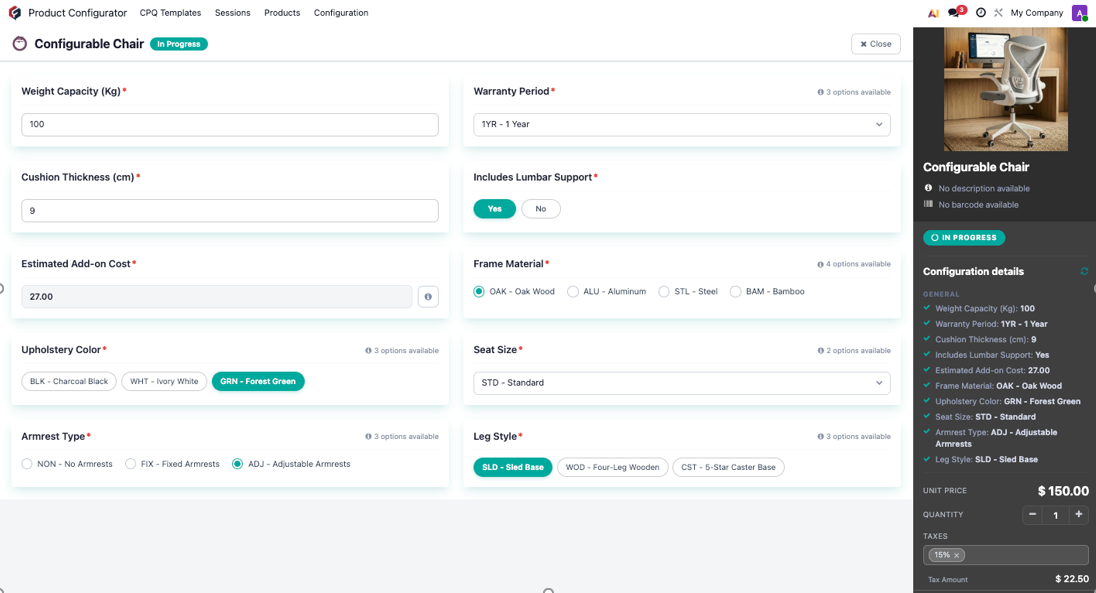
The buyer enters what only they can decide, and the Auto field calculates what should never be left to chance. That division, typed inputs for choices, computed fields for results, is the core discipline of a well-built parametric configurator.
Frequently Asked Questions
What are the field types in a parametric CPQ characteristic?
There are six: Integer and Float for numeric entry, Dropdown for a named set of choices, Boolean for yes/no, Text for free-form input, and Auto for values computed from other characteristics.
What is the difference between Integer and Float in parametric configuration?
Integer is for whole-number counts, Float is for continuous measurements. Using Integer where a value can be fractional can cause rounding issues in compute expressions that expect a whole number.
When should I use the Auto type instead of a dropdown?
Use Auto when the value should always be calculated from other fields rather than chosen or typed, so it can never drift from the formula. Use a dropdown when the buyer picks from a fixed, named list.
Can I change a characteristic’s field type after it is in use?
Technically yes, but it is risky if the characteristic is referenced in existing compute expressions or rules. Changing a type after go-live should be tested carefully rather than done casually.
What determines whether a dropdown shows as radio, pills, or select?
The display_type setting on the characteristic. Pills and radio suit a small number of visually distinct options, while select suits longer lists.
Can an Auto field be used in a compatibility rule?
Yes. An Auto characteristic’s live computed value can be used as the condition in a rule, which is exactly how numeric-threshold rules such as capacity-based matching work.