Furniture manufacturing is almost always high-mix, low-volume, make-to-order:
- Every project is slightly different – size, fabric, finish, hardware
- Jobs move between cutting, CNC, carpentry, upholstery, finishing, and packing
- Priorities change when the designer requests a change, a hotel project becomes urgent, or a fabric arrives late
This is textbook job-shop-style production, common in custom furniture manufacturing and inherently complex to schedule and control.
If you’re still running all that with whiteboards and Excel, you’re not alone.
Let’s first talk about the real problems that happen on a furniture shop floor, then we’ll see how Odoo Manufacturing + Shop Floor Management can actually help.
What Really Goes Wrong on a Furniture Shop Floor?
- Custom jobs, standard chaos
A single sofa order might include:
- Frame type: L-shape, 3-seater, lounger
- Wood: beech vs oak
- Foam densities by zone
- Upholstery: main fabric + piping + cushions
- Legs: style + finish
On paper, it’s just “SOFA-MOD-LUX, blue, oak legs”.
On the floor, that’s 10+ materials and 4–5 operations for you to line up perfectly.
In many factories, that detail lives in:
- A PDF from the designer
- An email with fabric reference
- A manual work order printout
- Tribal knowledge (“ask Jose, he knows this model”)
Result: frames are ready, but the right foam or fabric isn’t; or worse, the wrong variant is built.
2. High-mix, low-volume scheduling that changes every hour
Custom and project-based furniture is a classic high-mix, low-volume environment where product mix and priorities change constantly.
- A hotel project suddenly moves up: “We need 30 headboards before the sofas.”
- A fabric for Order #128 is delayed, so the planner wants to push its upholstery and pull another job forward.
- A CNC machine is down, so jobs must be redistributed.
On most furniture shop floors, this is handled via:
- A whiteboard with manually written job numbers
- A printed Excel schedule that is outdated by 10 am
- Walkie-talkies and shouting
So even when the planner updates the schedule, operators continue working on “what’s in front of them”, not what’s most important.
3. Material staging: frames here, fabric there, no one fully sure
Furniture is material-heavy and space-constrained:
- Wood, engineered boards, veneer, laminates
- Foam in multiple densities and thicknesses
- Hardware, hinges, brackets
- Rolls of fabric and leather
Typical shop-floor pain:
- Cutting starts without checking fabric availability
- Upholstery receives frames but wrong fabric bundle
- Two similar fabrics get mixed; rework shows up only at packing
- Extra sheets are cut “just in case”, creating hidden scrap and cost
Disconnected inventory and production systems make it hard to see if a job is truly ready to start or if it will get stuck halfway.
4. No real-time view of WIP (work in progress)
As a furniture manufacturer you might have asked this question frequently:
“How many orders are stuck in finishing right now?”
The usual answers:
- “We think around 8 or 10.”
- “We’ll check and let you know after lunch.”
Because:
- Work orders are printed and stamped
- Progress is updated on paper or spreadsheets
- Actual vs planned time is rarely recorded accurately
Scheduling and costing become guesswork instead of facts, and research on shop-floor scheduling confirms that missing real-time data leads directly to missed deadlines and lower productivity.
5. Quality and rework are handled “after the fact”
Furniture has a lot of “feel” and craftsmanship:
- A slightly misaligned seam
- A shade difference in stain
- A soft corner on a sharp profile
In many factories:
- Quality issues are written on stickers or shouted across the floor
- There is no structured way to log which work center caused what defect
- Rework is not properly linked to a specific order or operation
So you see rework and extra labour, but can’t trace patterns:
“Is it one operator, one machine, one vendor, or one design causing trouble?”
6. Costing is late, and often wrong
Without proper time tracking and consumption:
- Labour is allocated by rough percentages
- Scrap is not logged against specific jobs
- Extra materials used in rework are not captured
By the time finance runs the numbers, you only know:
“Custom sofas seem less profitable” – but not why.
What Good Shop Floor Management Should Look Like (Especially for Furniture)
Before we touch Odoo, let’s define a healthy state for furniture shop floor management:
- Every job is visible – where it is, who has it, what’s next
- Operators see clear, up-to-date instructions – variant, fabric, finish, options
- Material readiness is clear – you don’t start what you can’t finish
- Schedule reflects reality – changeovers, machine downtime, rush orders
- Quality is integrated – checks + alerts from the work center itself
- Time and consumption are captured – not perfectly, but consistently enough to trust costing
- The floor doesn’t fight the system – the interface is simple, touch-friendly, and made for the way people work
This is exactly where Odoo Manufacturing + Shop Floor come in.
How Odoo Helps Furniture Manufacturers Run a Smarter Shop Floor
Odoo already has a dedicated focus on custom furniture production, covering the full cycle from quoting and design through production and after-sales.
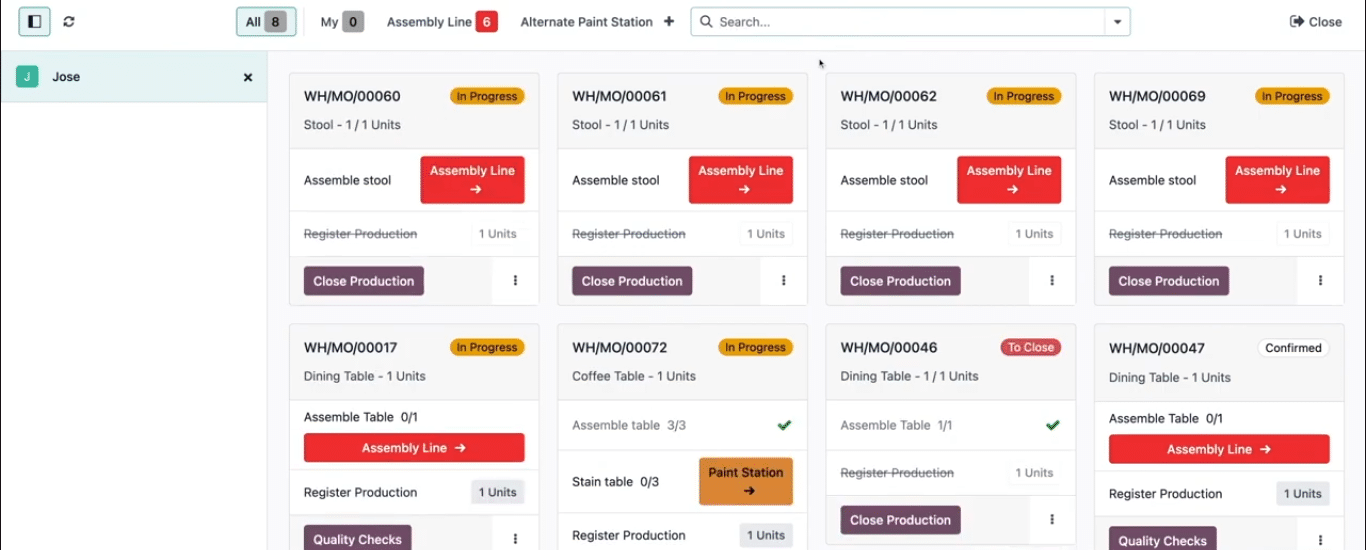
The Shop Floor Automation in Odoo is the piece that lives on tablets at work centers or terminals. It gives operators a visual interface to process manufacturing orders, start/stop work orders, and record time and activity in real time.
Let’s map the pain points we discussed to how Odoo can actually help.
1. From “model + notes” to structured custom jobs
For furniture manufacturing, Shop floor Control in Odoo lets you:
- Define configurable products (e.g., a sofa family) with attributes like size, fabric, leg type, arm style
- Link those attributes to a multi-level Bill of Materials and routing so that choosing “fabric X + leg Y” generates the correct components and operations automatically.
On the shop floor:
- The work order card in Shop Floor clearly shows the exact variant (fabric, size, finish, options)
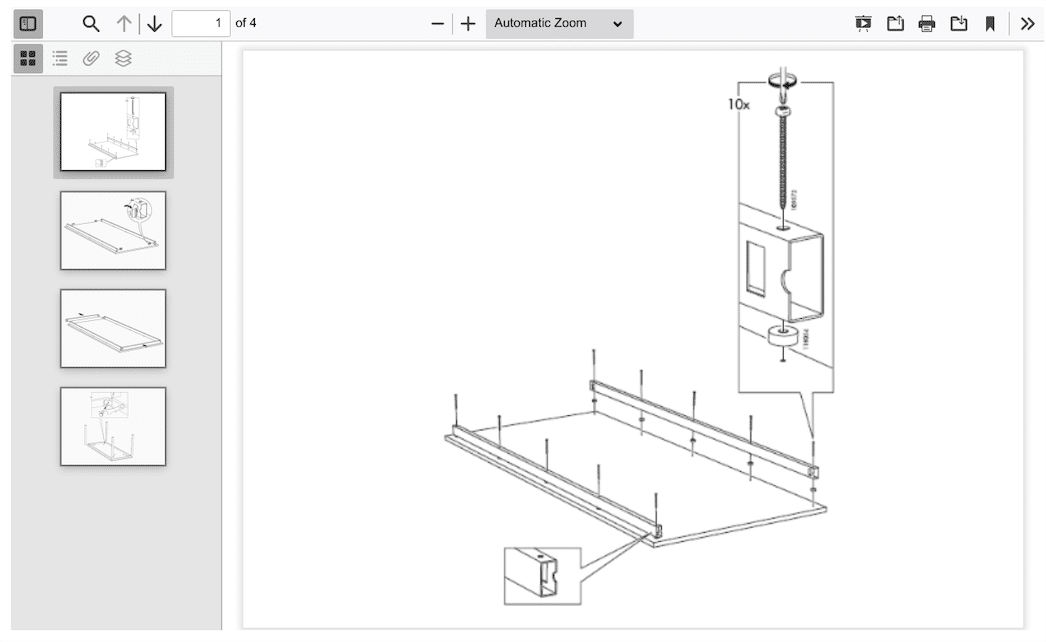
- You can attach worksheets or instructions (drawings, sewing patterns, assembly steps) directly to the operation
- Operators don’t have to interpret a vague description – they see what was actually sold
2. Realistic scheduling for high-mix furniture production
Odoo’s Shop Floor Automation features supports:
- Work centers with defined capacities and calendars
- Operation times (estimated) per routing step
- Priorities and deadlines for manufacturing orders
- Visual planning tools and drag-and-drop rescheduling in newer versions
The Shop Floor app turns that plan into a real queue for each work center:
- Operators see a list of pending work orders sorted by priority/due date
- When they start/stop a job, the schedule updates with actual times
- If a job needs to be moved to another work center, you can move it from Shop Floor itself
For furniture manufacturers, this means:
- Carpentry knows which frames to prioritize for an urgent hospitality order
- Upholstery doesn’t start a job that isn’t truly needed this week
- Supervisors can see where bottlenecks are emerging before it’s too late
3. Tighter link between inventory and the floor
Because Odoo uses one database for Inventory + MRP:
- MOs reserve materials from stock
- Pickings can be created to bring wood, foam, and fabric to the right work center
- The status of an MO clearly shows whether components are available or not
On the shop floor side:
- Operators can see if a job is “waiting for components” vs “ready to start”
- You can log extra components used (“Add component” from the Shop Floor work order card) if a piece is damaged or needs re-cutting
For a furniture plant, that helps avoid:
- Starting frame assembly when upholstery fabric is not even in-house
- Hidden material consumption that never hits the right job
- Scrap that mysteriously appears only in end-of-month stock adjustments
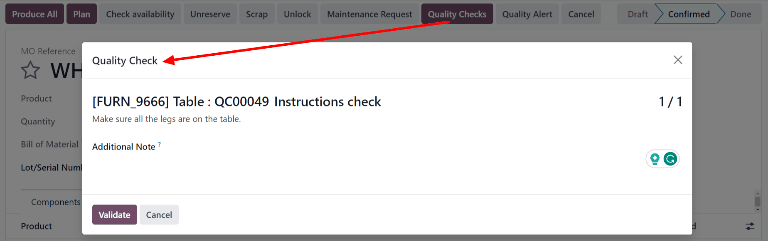
4. Integrated quality on the floor, not after it
Odoo’s Shop floor Quality Control app can create quality checks and alerts directly from work orders and shop floor.
You can:
- Define Quality Control Points for specific products or operations (e.g., “Check stitching alignment on upholstery”, “Measure diagonals on frame before finishing”)
- Enforce Pass/Fail, measurement, or instruction checks from the Shop Floor interface
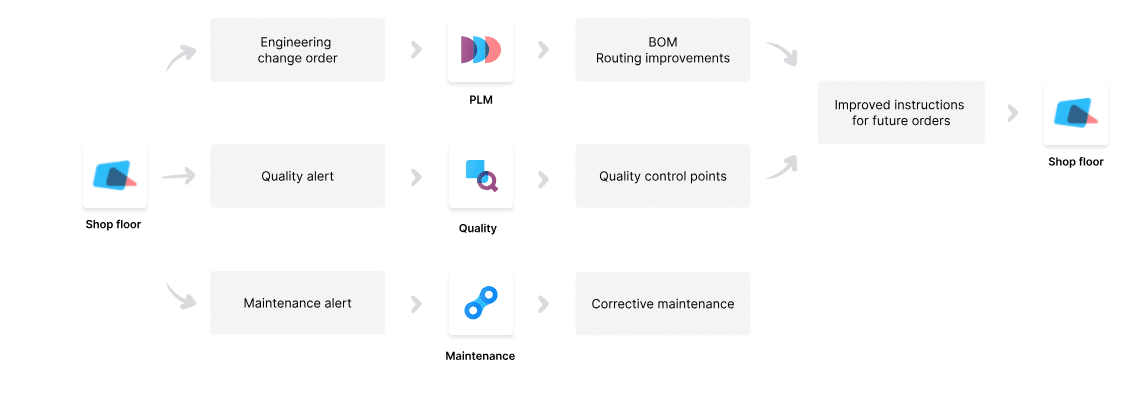
- Let operators create a quality alert on the spot if they see a problem (fabric shade mismatch, dent in wood, etc.)
Over time, you can see patterns:
“Most rework on this chair design comes from finishing, not carpentry,” or
“This specific fabric vendor has higher defect rates.”