Parametric CPQ reduces furniture design errors by computing derived values, panel area, edge-banding length, hardware counts, material cost, automatically the moment a dimension is entered, instead of asking a sales rep to calculate them by hand.
Because every value is derived from the same formula server-side, a mistyped or miscalculated number can no longer slip through to the cut list, the work order or the invoice.
A custom wardrobe order rarely goes wrong because someone picked the wrong finish. It goes wrong because a sales rep typed 1200mm instead of 1020mm, and nobody caught it until the panels were already cut.
Traditional furniture quoting tools ask a rep to manually calculate panel area, edge-banding length and hardware counts from raw dimensions, and every extra manual step is a place for the number to drift.
Parametric CPQ for Custom Furniture removes that step entirely by computing the derived values the moment a dimension is entered. Here is how that works, and what it changes.

Where does manual dimension math break down in furniture quoting?
Manual dimension math breaks down because it relies on a person doing arithmetic under time pressure, width times height for panel area, panel area times a material rate for cost, and so on down the bill of materials.
Each calculation is a place where one wrong keystroke becomes a mis-cut panel, a wrong invoice or a customer dispute weeks later.
Furniture manufacturers that still quote from spreadsheets or static price lists depend on someone getting every step right, every time. The trouble is that the risk compounds with every configurable dimension you add.
A wardrobe with width, height, depth and shutter count already has at least four inputs and several derived values, panel area, shutter width, hardware quantity, that all depend on getting both the base inputs and the formula right on every quote.
Miss one, and the error does not stay on the quote. It flows into the material cost, the cut list and the work order that reaches the shop floor.
How does parametric CPQ auto-compute furniture dimensions?
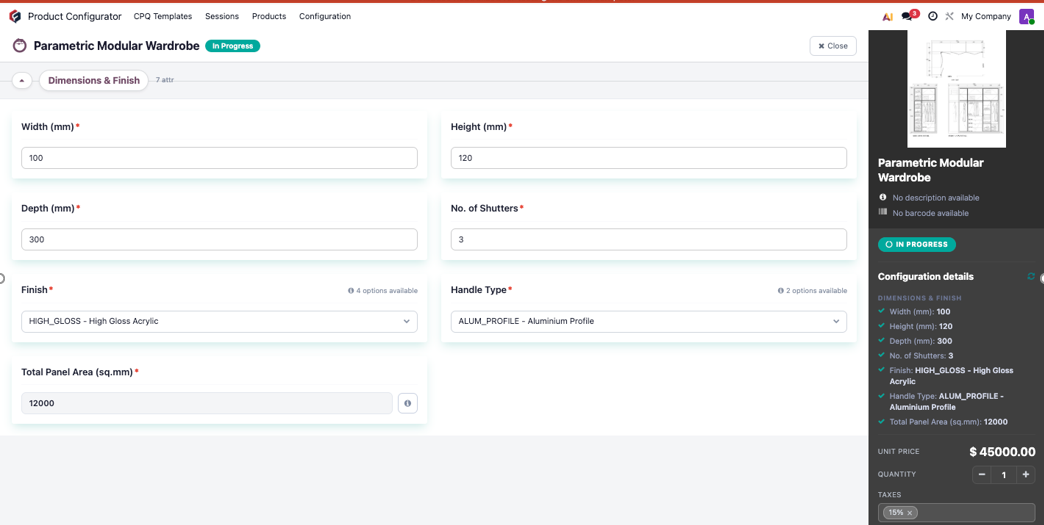
Parametric CPQ auto-computes furniture dimensions using an Auto-type characteristic with a compute expression that references other characteristics on the same product.
For a modular wardrobe, Total Panel Area is defined as WIDTH times HEIGHT, and the moment a rep changes either input, the derived value recalculates on screen before the quote is even saved.
Aktiv’s CPQ addon on Odoo lets you define that Auto-type characteristic once and let the system do the arithmetic on every quote thereafter. The rep enters the dimensions; the panel area, and anything derived from it, follows automatically.
It is not limited to simple multiplication. Compute expressions support arithmetic and conditional logic together, so you can build a rule like “if width exceeds 1200mm, add a center support panel” directly into the derived value.
That is logic that would otherwise live in a rep’s head, or in a training document nobody re-reads. Once it is in the compute expression, it applies on every quote whether the rep remembers it or not.
Manual quoting vs. Parametric CPQ for custom Furniture
| Manual dimension math | Parametric CPQ | |
| Who does the calculation | The rep, under time pressure | The system, on every quote |
| When derived values appear | After manual arithmetic | Instantly, as the dimension is entered |
| Conditional rules (for example, add a support over 1200mm) | Remembered, or in a document | Built into the compute expression |
| Two reps, same dimensions | Can produce different numbers | Always produce the same result |
| Quote vs. work order | Can drift apart | Stay matched, one computed source |
| Where errors surface | On the shop floor or the invoice | Caught at quote time |
How does auto-computed dimensioning change the quote-to-cash cycle?
It removes drift between the quote, the work order and the invoice.
Because the derived value is computed server-side from the same rule every time, two reps quoting the same dimensions always get the same panel area, the same material cost and the same price, with no spreadsheet drift and no mismatch between the quote and the work order sent to the shop floor.
There is a pricing benefit too. The pricing engine can consume the computed value directly, so a wardrobe’s sale price scales accurately with its real material usage instead of a flat per-unit rate.
A flat rate either overcharges small units, which costs you deals, or underprices large ones, which costs you margin. A price derived from actual panel area does neither.
And because the same computed panel area or material quantity can flow into the bill of materials, the work order that reaches production carries the exact quantities the customer was quoted.
The cut list matches the quote by construction, not by someone double-checking it.
Can compute expressions reference more than two dimensions?
Yes. An Auto-type characteristic’s compute expression can reference any number of other characteristics on the same template, including other auto-computed values, as long as the dependency chain does not loop back on itself.
Does this replace the need for a BOM?
No. It feeds the BOM. The computed panel area or material quantity can drive downstream manufacturing and purchase quantities, so the work order matches the quote automatically.
What happens if a rep enters an invalid dimension?
You can pair auto-computed characteristics with compatibility rules that hide, disable or flag options outside a valid range, so bad inputs are caught at quote time, not on the shop floor.
Is Parametric CPQ different from a standard furniture configurator?
Yes. A standard configurator selects from pre-set options and cannot compute a value from a dimension. Parametric CPQ computes derived values and enforces conditional rules, which is what makes auto-computed dimensioning possible. See our explainer on what parametric CPQ is and how it differs from standard configurators.