The modern kitchen is no longer just a utility; it’s a statement of lifestyle. Customers expect bespoke layouts, custom finishes, and flawless functionality, all delivered fast.
But behind every dream kitchen is a project with different dimension, material, and design, making it nearly impossible to standardize without losing flexibility.
That’s when you’ll start exploring options for a kitchen design software.
In this blog, we’ll be covering one such software- Odoo for Modular Kitchen Manufacturers, a single system to design, configure, produce, and deliver with accuracy.
To understand the solution better, we’ll take a dummy example- CraftLine Kitchens, a mid-sized manufacturer based in North Carolina, producing custom modular kitchens for homeowners and real-estate developers across the U.S.
Challenges of CraftLine Kitchen Manufacturers
- Lead Management: Scattered across emails and spreadsheets
- Quotation & Pricing: Manual Excel-based pricing; 2–3 days per quote
- Design & Configuration: Separate design tools disconnected from production
- Material Procurement: Reactive, manual purchase requests
- Production Scheduling: No real-time visibility; frequent bottlenecks
- Installation Tracking: Managed through WhatsApp & phone updates
- Invoicing & Payments: Delayed manual invoicing
- Profitability Analysis: Calculated post-delivery
Odoo: The ERP That Thinks Like a Modular Kitchen Manufacturer
With fragmented tools and manual quoting, production was outgrowing their systems fast.
That’s when CraftLine partnered with Aktiv to implement Odoo ERP for Modular Kitchen Manufacturing business.
So, we extended Odoo into a furniture manufacturing software designed specifically for kitchen and modular furniture makers.
It combines Odoo ERP with a built-in CPQ (Configure–Price–Quote) engine and a kitchen configurator software interface to connect every stakeholder, from the designer’s desk to the final installer.
How CraftLine Kitchen used Odoo for Manufacturing?
Step 1: From Inquiry to Qualified Lead (Odoo CRM)
Every new inquiry from CraftLine’s website or showroom flows into Odoo CRM automatically:
- Leads are categorized by region, layout type, and budget.
- Automated emails schedule design consultations.
- Sales managers track pipelines visually: Lead → Design Discussion → Quotation → Won.
Impact: No leads lost. Conversion tracking became transparent across all sales reps and franchises.
Step 2: Use Odoo CQP for Kitchen Configuration & Quotation
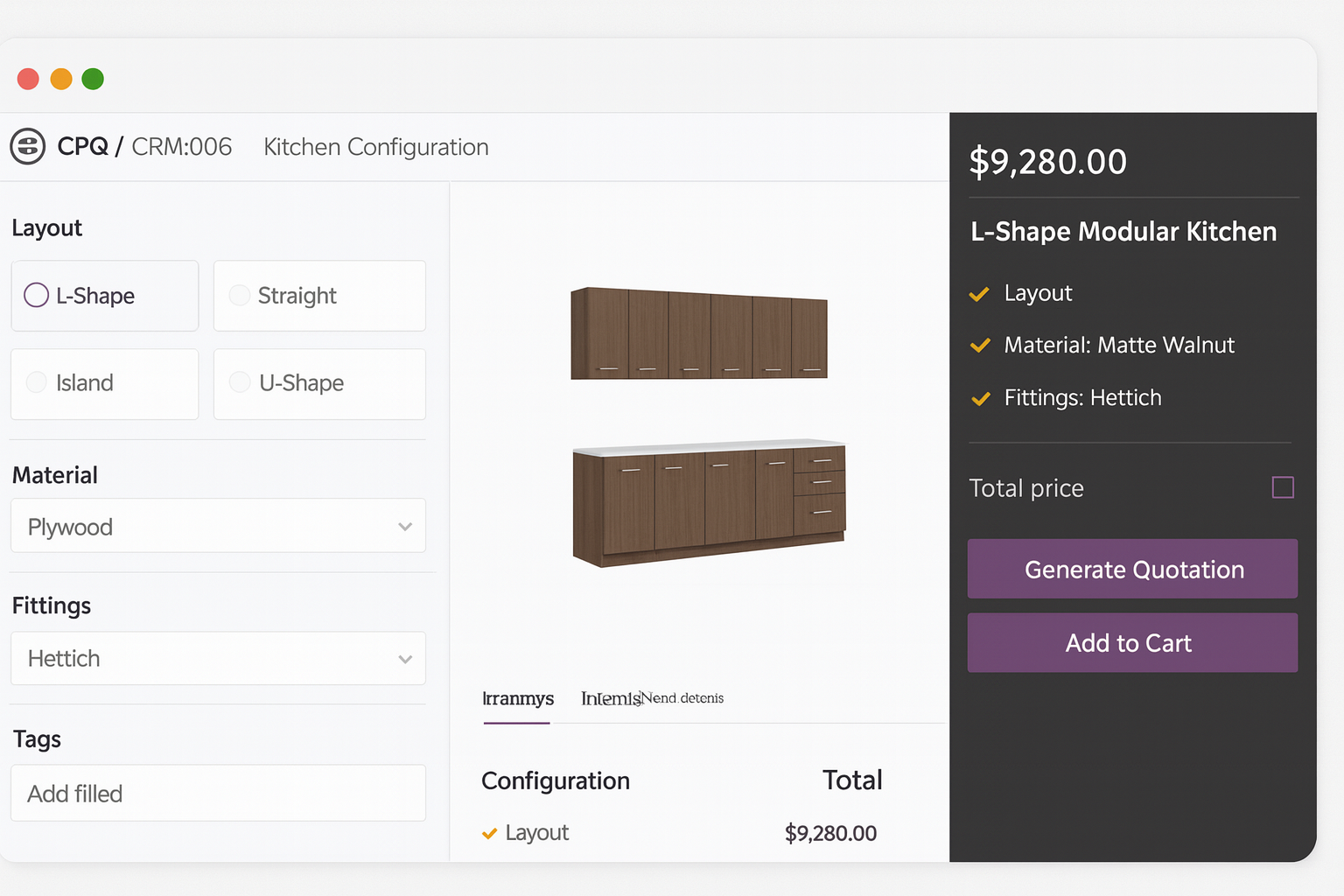
Once a customer’s layout is approved, CraftLine’s designer uses a custom furniture configurator inside Odoo Sales.
- Select base layout: L-Shape, U-Shape, Island, Straight Line
- Enter wall and cabinet dimensions
- Choose materials and finishes: Matte Walnut, Gloss White, Oak Veneer
- Select fittings: Hettich / Hafele / Blum
- Add modular options: Corner unit, Pantry tower, Pull-out baskets
How Kitchen Design Software works:
- CPQ applies rule-based logic (no invalid combinations).
- The system recalculates price in real-time using cost formulas (e.g., sq. ft × material + finish + hardware).
- Quotes include visuals, estimated delivery, and margin-based pricing.
Example:
“U-Shape Modular Kitchen, 15×10 ft, Gloss White Finish, Blum Fittings – $11,750 – Delivery in 30 days.”
Impact: Quote time dropped from 3 days to 25 minutes, with zero manual calculations.
Step 3: Automatic BOM & Manufacturing Order Generation
When a customer approves the quotation:
- The Odoo CPQ engine automatically creates the Bill of Materials and Routing.
- Odoo MRP instantly generates Manufacturing Orders (MOs).
- Each MO defines work centers: Cutting → Edge Banding → Assembly → Finishing → QC → Packaging.
Supervisors see daily workload and job status via Odoo’s shop floor view. No double data entry, no manual handoffs between sales and production.
How a Meat Processing Equipment Maker Reduced Production Errors by 90%>>
Step 4: Inventory & Procurement
Inventory management in kitchen manufacturing is one of the critical aspects & that’s why Odoo Inventory and Purchase apps are integrated seamlessly for:
- Automatic RFQ generation for missing materials.
- Vendor lead times and price lists adjust automatically.
- Stock movement is tracked by barcode and batch number.
- Real-time dashboards show stock aging, material cost trends, and WIP inventory value.
Procurement managers can plan purchases proactively, reducing idle time and over-purchasing.
Step 5: Production & Shop Floor Management
Odoo Manufacturing module ensures there’s no production delay and every order follows the correct sequence.
- Digital job cards track time per work center.
- Maintenance module prevents machine downtime.
- Quality checks occur after each stage (cutting, lamination, assembly).
- Workers scan QR codes to mark task completion in real time.
Supervisors gain live production insights, visible from both plant dashboards and mobile tablets.
Step 6: Installation & Field Coordination
Each installation project is managed inside Odoo Project App.
- Tasks like Delivery → Site Preparation → Installation → QC → Client Sign-off are tracked with deadlines.
- Installers upload photos, checklists, and customer approvals via mobile app.
- The customer receives automatic status updates and can approve via portal login.
No miscommunication between factory and field teams.
Step 7: Invoicing, Payments & Financial Control
When an installation project is marked complete:
- Odoo Accounting generates milestone-based invoices.
- Partial payments and advance deposits are auto-linked to the same sales order.
- Expense entries (transport, fittings, subcontractor charges) sync for job costing.
- Dashboards display profitability per order, sales by layout type, and receivables aging.
CFOs no longer wait for monthly reconciliations; they see profitability per kitchen.
Explore AI-powered Accounting software for your Manufacturing business>>
Step 8: Reporting, Dashboards & Continuous Improvement
Odoo Spreadsheet + Studio Dashboards now deliver instant intelligence:
- Quotation-to-sale conversion rates
- Average cost per sq. ft by design type
- Material waste ratios
- Work center efficiency
- Supplier performance
Before & After choosing Odoo as Kitchen Design Software
| KPI | Before | After Odoo + CPQ |
| Quote Creation Time | 2–3 days | 0.5 days |
| BOM Accuracy | 80% | 100% |
| Procurement Delay | 2–5 days | Instant with auto RFQs |
| Material Waste | 10–12% | <3% |
| Project Profit Visibility | End of month | Real-time |
| Delivery Time | 35–45 days | 25–28 days average |
Whether you’re a bespoke modular kitchen studio or a nationwide brand, Odoo brings your entire business under one roof- from design to dispatch.
Book a Demo | See how we can help you turn design complexity into operational clarity.