Imagine having just the right set of products addressing your customers’ needs. It seems like hitting that market-consumer sweet spot! But what if your amazing product is sitting in the shadows, unnoticed by your target customers?
This often happens when a website isn’t optimized for search engines. Despite having the perfect offering, poor SEO configuration can hinder your visibility, leaving your audience unaware of your product/offering.
Search Engine Optimization (SEO) is crucial for ensuring your website ranks high on search engines and attracts the right audience. This blog will walk you through the essential OdooWebsite SEO configuration and how to leverage them effectively.
Table of Contents
Steps to Perform Odoo Website SEO Configuration
1. WebPage Creation
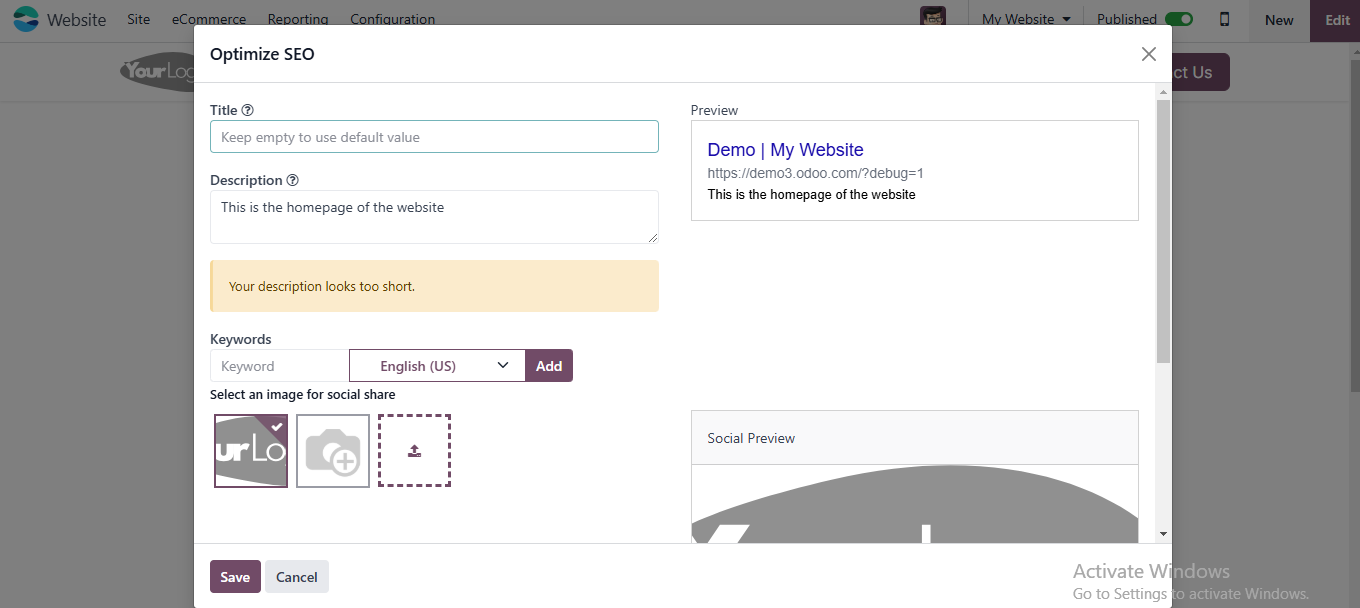
Titles, meta descriptions, and keywords help search engines understand your content. Titles grab attention, meta descriptions improve click-through rates, and keywords connect your content to user searches.
Title: Craft a concise and compelling title with relevant keywords.
Meta Description: Write a descriptive summary (155–160 characters) that includes primary keywords to entice clicks from search results.
Keywords: Use targeted keywords that align with your content and audience.
Heading Tags: Structure your content using H1, H2, and H3 tags to improve readability and SEO.
2. Image Optimization
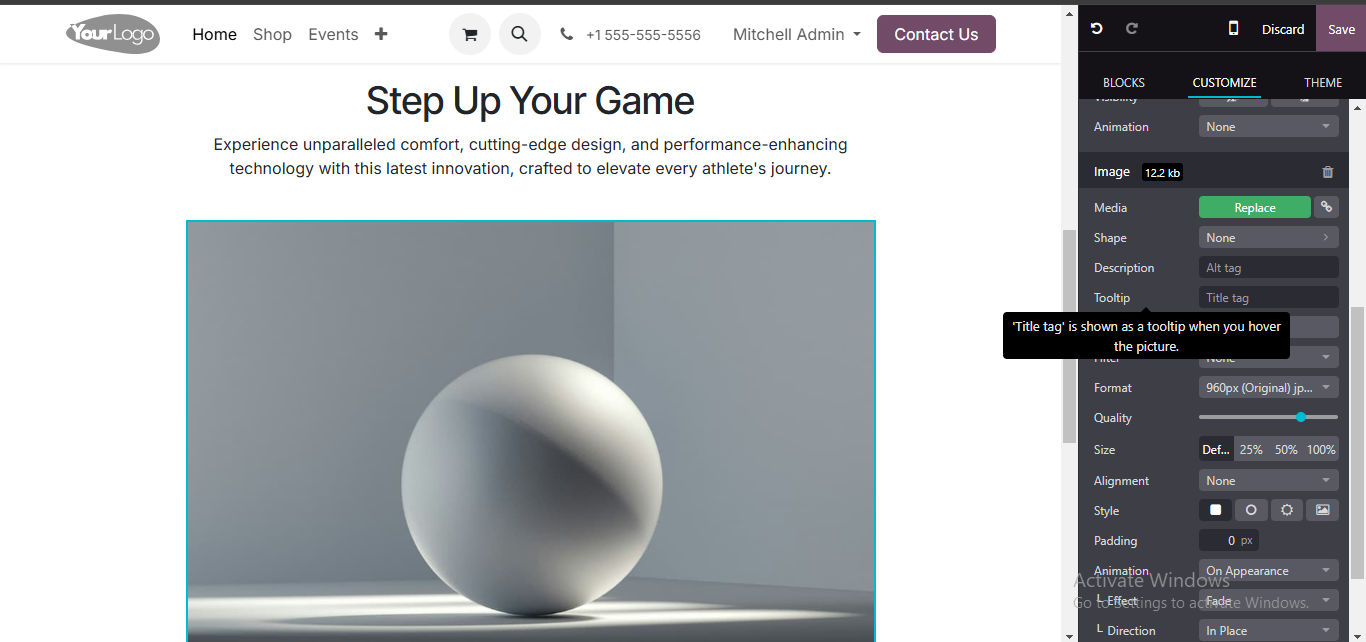
Images enhance user experience but can slow down your website if not optimized. Adding alt text makes images accessible and improves your SEO by helping search engines index them. Use descriptive names and formats for better clarity and engagement.
Double-click on the placed image.
Go to the Customize section.
Add the image name, description, and format.
Enhance visual appeal with animation options.
3. Link Tracker
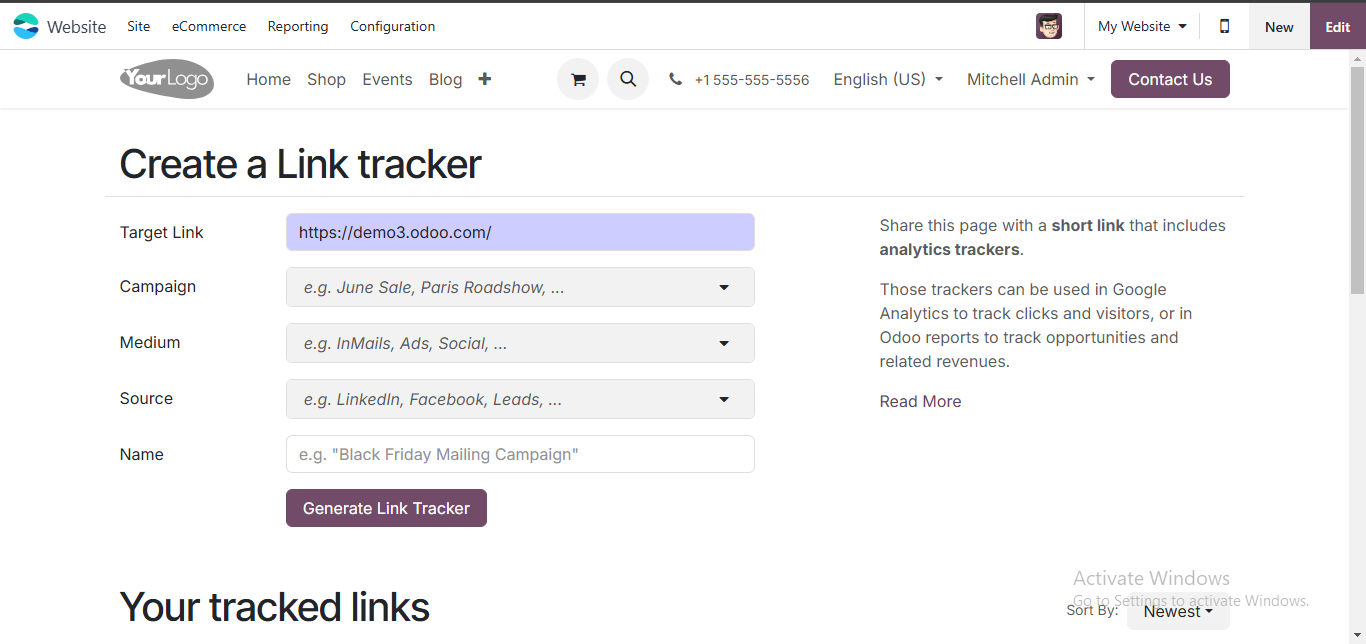
Tracking URL performance while running campaigns on third-party platforms is key to understanding user behavior. Odoo Website SEO features have link tracker that lets you measure engagement on specific links, helping you refine your strategies for higher conversions. To activate it:
Navigate to Site > This Page (Link Tracker) to track clicks and measure engagement.
4. URL Optimization
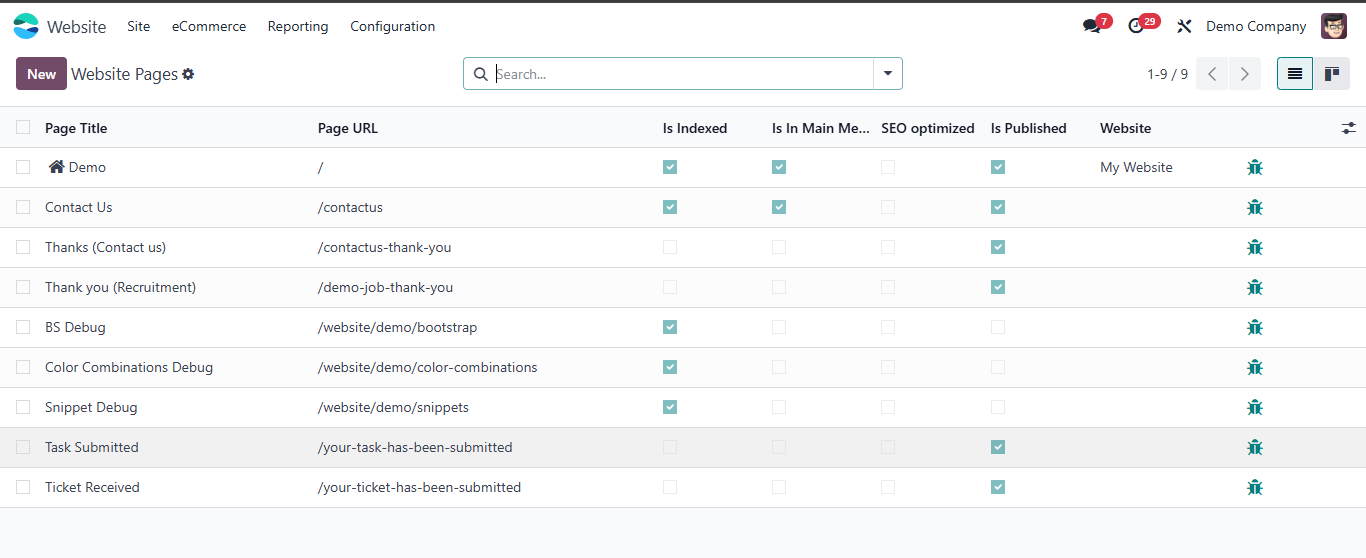
SEO-friendly URLs improve rankings and usability. They should be short, descriptive, and include keywords. Odoo Website module allows you to easily check and edit URLs to ensure they are optimized for both search engines and users.
Go to Site > Pages to:
Check if the page URL is indexed.
Confirm it is SEO-optimized and published.
5. URL Redirection
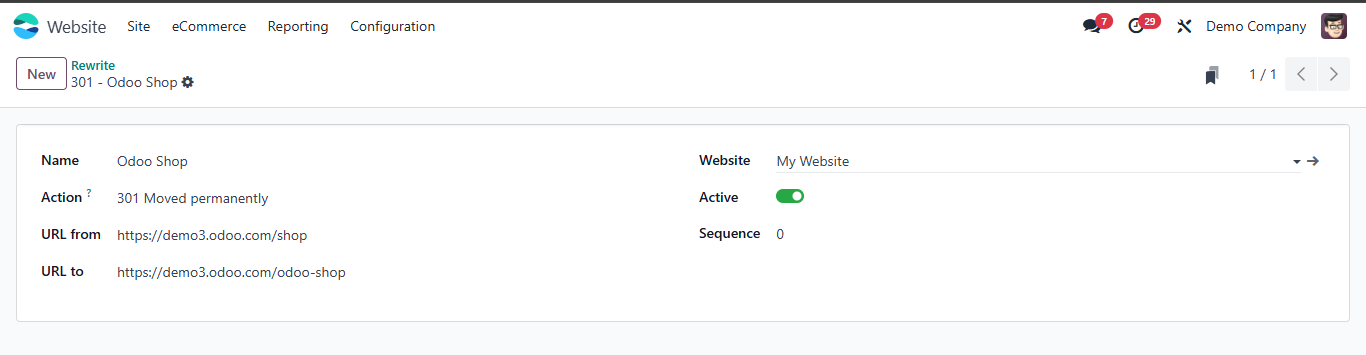
Redirecting outdated or broken links prevents loss of SEO value and enhances user experience. This ensures visitors reach the right pages without encountering errors. Set up URL redirects in Odoo to avoid broken links and maintain SEO value:
Go to Configuration > Redirects to manage your URL redirection settings.
6. Multi-Language Configuration
Offering content in multiple languages helps you reach a broader audience. Odoo Website SEO has multi-language features, ensuring inclusivity and improved SEO for different regions. Expand your audience by enabling multiple languages:
Navigate to Configuration > Add Languages or Install Languages to set up and manage multilingual options.
7. Schema Markup
Schema markup is a form of structured data that helps search engines understand your content better. It enhances search result appearances, such as showing ratings or FAQs, leading to higher click-through rates.
You can perform Schema Markup in two ways:
Use an add-on module from the Odoo App Store for automated schema integration.
Alternatively, work with a developer to add schema manually. You can generate schema using third-party tools or websites.
8. Sitemap
A sitemap is a blueprint of your website that helps search engines index your pages effectively. It ensures that all important pages are discoverable and ranked appropriately.
Generate and submit a sitemap to improve site indexing. This can typically be configured within Odoo’s Website settings or by using additional modules.
9. Google Analytics Configuration
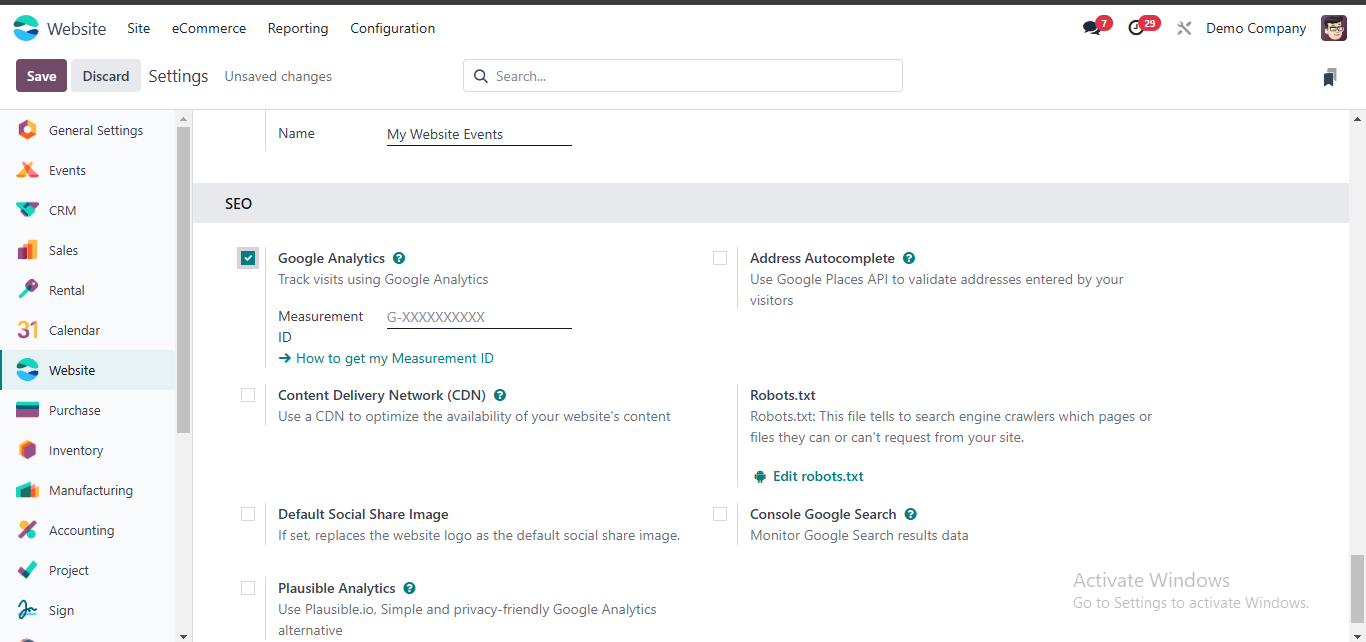
Integrating Google Analytics with Odoo SEO, it provides insights into user behavior, helping you make data-driven decisions to improve your SEO efforts. To configure:
Obtain your tracking ID from Google Analytics.
Place it in the Configuration section under GA Analytics in the Website Module.
Essential Technical SEO Settings in Odoo Website
To help search engine crawlers easily explore, understand, and rank your website, head over to Website > Configuration > Settings and review these key features:
User-Friendly URLs: Odoo naturally creates clean, readable static URLs instead of cluttered parameters (like ?id=123). Keep your URL slugs concise and packed with relevant keywords.
Sitemap and Crawl Control: An XML sitemap is built automatically at /sitemap.xml. You also have the flexibility to edit your robots.txt right from the settings to guide search engine bots on what to access.
Secure HTTPS Browsing: For Odoo Online setups, HTTPS is enabled by default, effortlessly redirecting insecure traffic via 301 redirects to keep your site safe.
Social Media Open Graph Images: Upload a default social share image (ideal dimensions: 1200×630 pixels) under your website settings to ensure your links appear polished and engaging across platforms like LinkedIn, Facebook, and Twitter.
If you are still confused about Odoo Website SEO configuration, we have SEO & Odoo functional experts to guide you. Schedule a consultation call.
FAQs to Get Odoo Website SEO Right!
1. How does Odoo handle multi-language hreflang tags, and how do I prevent Google from misindexing language versions?
Odoo automatically generates hreflang headers linking localized versions (/en/..., /es/..., /fr/...). To ensure this works properly, never mix languages within the same page body using manual translations. Always use Odoo’s native multi-language toggle at the top of the editor so Odoo assigns separate translation records with distinct URL prefixes and correct localized canonical references.
2. Can I customize the default product URL structure to remove ID numbers, and does it affect rankings?
While Odoo natively appends the database ID to prevent broken links if two products share the same name, search engines easily ignore the ID as long as the text slug is clean and keyword-rich. If you want completely ID-free URLs, you can override routing controllers via a custom OCA module, but ensure robust 301 mapping is deployed to prevent mass 404 errors during transition.
3. Can I set default global Meta Tags so I don’t have to manually optimize hundreds of dynamic product or blog pages?
Odoo handles fallback metadata automatically via its website views and templates. For advanced global defaults or dynamic meta inheritance, you can customize the QWeb templates (specifically layout views like website.layout or eCommerce product layout views) to programmatically pull fields—such as product name, short description, or category—into the <title> and <meta name="description"> tags dynamically if specific custom fields are left blank.
4. How do I properly configure custom 301 redirects in Odoo when migrating an old website structure?
Go to Website > Configuration > Redirects (available with developer mode or SEO tools). Here, you can manually map old paths to new Odoo paths, select the action type (301 Moved Permanently or 302 Moved Temporarily), and ensure search engine link equity passes seamlessly to your new Odoo pages.
5. How do I configure multi-website SEO settings if I manage multiple domains under a single Odoo database?
In the top-right website switcher of the Odoo backend, select each website individually before going to Configuration > Settings. Odoo allows distinct configurations per website instance—meaning each site can have its own unique domain name, custom Google Analytics tracking ID, dedicated robots.txt rules, and isolated /sitemap.xml output.
Arpit Sheth is an Enterprise Sales & BD Professional and ERP specialist.
Leveraging deep expertise in Odoo, he helps mid-market and enterprise businesses eliminate operational silos, modernize legacy systems, and build scalable digital ecosystems.