What This Guide Covers
- What B2B self-service quoting is and why it is now a baseline expectation
- What the traditional quoting process actually costs your business
- How Odoo CPQ’s Customer Portal enables self-service quoting end to end
- How to set up Self-Service Quoting with CPQ in Odoo?
- Which business types see the biggest impact
- Common objections and honest answers
What Is B2B Self-Service Quoting?
B2B self-service quoting gives business customers the ability to configure, price, and request quotes independently, through a dedicated online portal, at any hour, without waiting for a sales rep to respond.
The concept is not new in B2C. Amazon, Apple, and virtually every e-commerce platform has worked this way for years. What has changed is the expectation that B2B purchasing will work the same way. According to McKinsey & Company, 73% of B2B buyers now prefer a self-service or digital-first buying experience over interacting with a sales representative.
This is not primarily a technology shift. It is a generational one. A growing proportion of B2B purchase decisions are made by professionals who grew up with digital-first experiences and have no patience for a process that requires them to wait 48 hours for a price they could calculate themselves in five minutes, if the tools existed.
Businesses that offer self-service quoting are signalling that they are organised, modern, and easy to buy from. Businesses that do not are increasingly signalling the opposite and their customers are noticing.
Why Traditional B2B Quoting Is Costing You More Than You Think?
Before getting into how Odoo CPQ solves this, let’s understand how is the traditional quoting process costing your business.
The waiting game
In a standard quoting process, a customer contacts your business, explains what they need, and waits. Your team picks up the enquiry, builds the quote, gets it approved, and sends it back. In most businesses, that window is 24 to 72 hours. In that window, one of three things happens: the customer waits patiently, the customer chases your team and feels like a burden, or the customer has already received a quote from a competitor and moved on.
The first outcome is becoming rarer.
The accuracy problem
When quotes are assembled manually, errors happen- mis specified products, prices pulled from outdated sheets, discount tiers applied incorrectly. The customer receives a quote that needs correcting. More back-and-forth. More delay. More erosion of trust before the relationship has properly begun.
The availability problem
Your sales team works business hours. Your customers’ purchasing needs do not. A customer reviewing options at 9pm, or operating from a different time zone, cannot get what they need no matter how capable your team is. The opportunity exists; the infrastructure does not.
61% of B2B buyers make a purchase decision before speaking to a sales representative. Being visible and functional at the research stage, with self-service tools, is where deals are increasingly won or lost. (Source: Gartner)
Every hour a customer spends waiting for a quote is an hour they spend on a competitor’s website. In a buying environment where instant is the expectation, delay is not just an inconvenience, it is a commercial risk.
How to Enable B2B Self-Service Quoting with CPQ in Odoo?
Odoo CPQ’s Customer Portal converts the traditional quoting process into a fully self-serve digital experience. Its primary advantage over standalone CPQ tools is that it is not a separate system bolted onto your sales process, it uses the same product data, the same pricing rules, and the same approval logic your sales team uses, accessed directly by the customer.
The Customer Portal: your buyer’s digital front door
The Odoo Customer Portal gives B2B buyers a dedicated, branded online space where they can log in, review their account history, access past quotes, track active orders, and most critically, configure and submit new quote requests entirely on their own terms.
The portal is not a generic product catalogue. What each customer sees the products available, the prices displayed, the configuration options offered is controlled by the commercial relationship your business has with them. A preferred partner sees their
The portal is not a generic product catalogue. What each customer sees the products available, the prices displayed, the configuration options offered is controlled by the commercial relationship your business has with them.
A preferred partner sees their negotiated rates. A new account sees standard pricing. A customer in a specific industry sees only the product range relevant to them. This is all managed centrally in Odoo and applied automatically at the portal level, with no manual intervention required.
Guided product configuration: how customers build valid quotes without a sales rep
The product configurator in Odoo is the mechanism that makes complex self-service quoting possible. Rather than presenting a flat list of options and leaving the customer to determine what works together, the configurator uses built-in rules and logic to:
- Show only the products and variants relevant to each customer’s profile and selections
- Block invalid or incompatible combinations before they reach the quote stage
- Surface complementary products, upgrades, or bundle options that increase order value
- Apply volume pricing, tier discounts, and customer-specific rates as selections are made
- Display the correct price in real time- no waiting, no calculation, no follow-up required
The customer experience feels guided and under their control. The business retains complete governance over what is offered and at what price.
Real-time pricing: removing the biggest friction point in B2B purchasing
When a customer configures a product through the Odoo CPQ ecommerce portal, the system applies all applicable pricing rules instantly customer-specific contracts, volume discounts, promotional rates, currency adjustments, and tax and shows the correct figure immediately.
This matters more than the time saving. The uncertainty of not knowing what something costs until a salesperson gets back to you is one of the most consistent sources of friction in B2B purchasing. Certainty accelerates decisions. When customers can see accurate pricing as they configure, the path from interest to quote submission shortens dramatically.
For repeat customers, who already know what they want and simply need to confirm pricing before committing what previously required an email and a day’s wait becomes a thirty-second interaction.
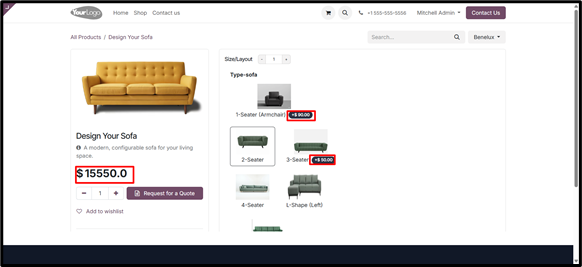
B2B Self-Service Quoting Portal in Odoo CPQ
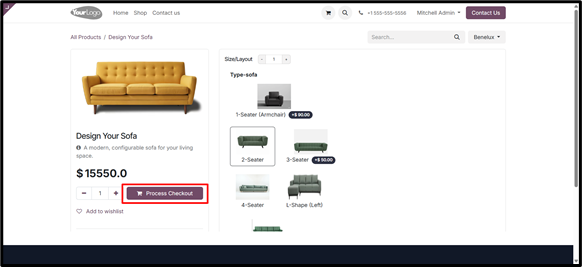
B2B self-service quoting with CPQ in Odoo- Direct Checkout
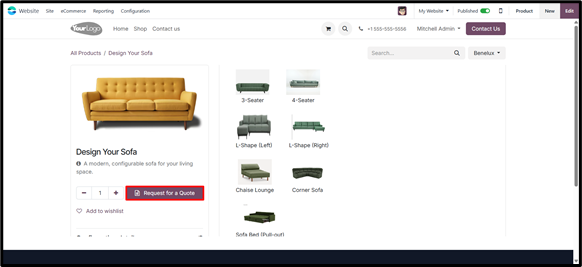
B2B self-service quoting with CPQ in Odoo- RFQ
How to Set Up Self-Service Quoting in Odoo CPQ?
Enabling self-service quoting in Odoo CPQ does not require a development project. The following steps reflect the actual configuration sequence involved.
Step 1 — Enable the Customer Portal in Odoo The Customer Portal is available within the core Odoo Sales module. Enabling it gives your customers access to a branded portal that surfaces their quotes, orders, invoices. This is the foundation everything else builds on.
Step 2 — Build your product catalogue with CPQ rules Using Odoo CPQ’s configurator, define which products are available for self-service, what variants and add-ons customers can select, and what compatibility rules govern the configuration flow.
Step 3 — Set up customer-specific pricing lists Define pricing lists in Odoo that reflect your commercial terms for different customer segments, individual accounts, or contract agreements. Assign these to the relevant customers so that portal pricing is accurate and personalised from the moment a customer logs in.
Step 4 — Configure approval and workflow rules Not every quote request needs to go through a sales rep. Odoo’s approval workflow engine lets you define thresholds: orders below a certain value or within certain product categories can be auto-approved, while complex configurations or high-value requests are routed to a rep for review. The goal is the right level of human involvement at the right stage, not the removal of your sales team from the process.
Step 5 — Brand the portal experience Configure the portal to reflect your business: your logo, colours, and quote template. The customer’s experience should feel like an extension of your business, not a third-party software interface.
Step 6 — Invite customers and go live Send portal access invitations directly from Odoo. Customers receive a login link, set their credentials, and can immediately begin accessing their account and configuring quote requests. No app to download, no separate onboarding process, a browser and a login is all that is required.
Benefits of Self-Service Quoting: The Business Outcomes
The customer experience benefit is clear. The internal business impact is equally significant:
- Lower sales team workload on routine quote requests– reps focus on complex, high-value deals that require human input
- Faster quote-to-order conversion– the back-and-forth that adds days to standard purchasing decisions is eliminated
- Higher quote volume without additional headcount– the portal handles as many simultaneous requests as your customer base generates
- Higher average order values– through intelligent upsell suggestions and bundle recommendations built into the configurator logic
- Consistent pricing accuracy– every customer-generated quote uses the same centralised rules as your sales team, eliminating manual error
- 24/7 availability– customers in different time zones or working outside your business hours can access pricing and submit requests at any time
- Complete audit trail– every quote submitted through the portal is logged in Odoo, giving management full visibility into customer purchasing patterns and activity
Common Questions, With Honest Answers
How does Odoo CPQ’s Customer Portal work? Odoo CPQ’s Customer Portal gives B2B buyers a branded, secure online environment where they can access their account history, configure new quote requests using a guided product configurator, see pricing in real time based on their specific commercial terms, and submit quote requests directly into your Odoo Sales pipeline.
Can customers see their own negotiated pricing in the Odoo portal? Yes. Odoo’s pricelist system allows you to assign customer-specific or segment-specific pricing lists to individual portal users. When a customer logs in and configures a product, they see only the pricing that applies to their account- contract rates, volume discounts, or standard pricing, depending on their classification.
Do all quote requests require sales team approval? Not necessarily. Odoo CPQ’s approval workflow allows you to define thresholds: some requests can be auto-approved and proceed directly to order confirmation, while others — above a value threshold or involving custom configuration are routed to a sales rep for review. The split can be configured to match your business process.
Which industries benefit most from self-service quoting? Manufacturing and industrial supply, wholesale distribution, technology resellers, and professional services businesses with standardised service tiers see the most consistent impact. The common factor is a customer base that places repeat or semi-standardised orders and simply needs a faster, more convenient way to price and submit them.
Is Odoo CPQ self-service quoting available on the eCommerce module? Odoo CPQ’s portal self-service capability operates through the Customer Portal within the Sales module. A separate eCommerce add-on is available for businesses that want to extend self-service quoting to a public-facing website with checkout functionality.
Odoo CPQ’s Customer Portal gives your business the infrastructure to meet customers where they already are: with a self-service quoting experience that is fast, accurate, personalised, and available at any hour.
It does not replace your sales team. It makes them more effective by handling the routine so they can focus on the work that genuinely requires them.
The technology is mature. The implementation is accessible. The customer expectation is already set.
The only question is how much longer you want to make your customers wait. Ready to enable self-service quoting for your B2B customers?
Schedule Demo>>