Automate Expense Management in Odoo automatically matches card transactions to employees, identifies merchants, categorizes expenses, assigns the correct expense accounts, and attaches receipts with SHA-256 verification.
It creates draft expenses in Odoo and prepares transactions for bank reconciliation, eliminating manual data entry and reducing dependency on third-party expense management apps.
Finance teams retain full control over review and approval, with no automatic journal posting.
The Manual Problem: card expenses handled by hand, across two systems
The company issues cards to its employees. Card payments reached Odoo as bank statement lines through Ponto, while receipts sat in a separate expense app that exported them as PDF expense sheets.
A statement line shows only a short merchant name and an amount. The details accounting needs, such as which card was used, who holds it and what kind of merchant was paid, live in the card bank’s portal. So, the team had to:
- Look up card, holder and merchant details in the bank portal.
- Match each transaction to the employee who holds the card.
- Classify merchants the bank spells in different ways, which made reporting inconsistent.
- Pick the expense category and account per transaction, with rules that depend on employee, department and category.
- Pull receipt photos out of PDF expense sheets and attach them one by one.
- Re-create each expense in Odoo and reconcile every card line one by one.
The result was slow, error-prone work, plus the cost of a separate expense app.
How the Odoo n8n Automation works for Expense Management?
Once Ponto syncs the card statement, n8n picks up each new card transaction, adds the card bank’s own data, and writes the result back to Odoo.
Every transaction reaches reconciliation already classified, with its receipt and a draft expense.
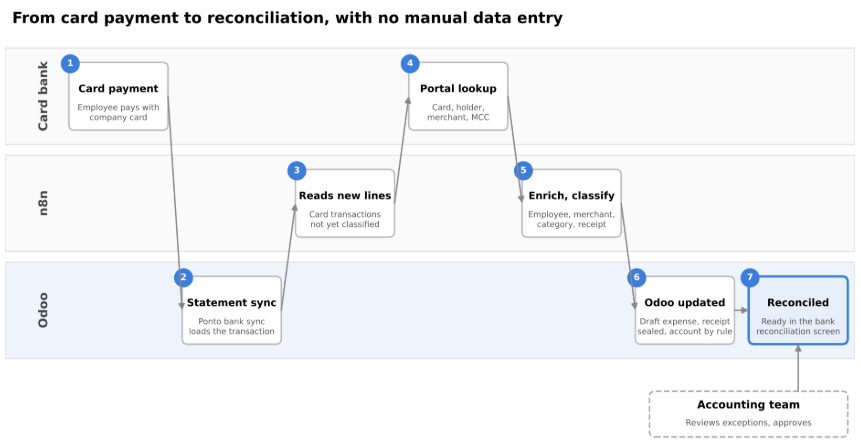
- Step 1: Card payment: an employee pays with a company card.
- Step 2: Statement sync: Ponto loads the transaction into the card journal in Odoo.
- Step 3: Read: n8n picks up card transactions that are not yet classified.
- Step 4: Portal lookup: n8n fetches the card, holder, merchant and merchant category code (MCC) from the card bank’s portal.
- Step 5: Enrich and classify: n8n identifies the employee and department, recognizes the merchant across spelling variants, and sets the expense category with a confidence score.
- Step 6: Odoo updated: the receipt photo is attached and sealed, the expense account is set by rule, and a draft expense is created and linked.
- Step 7: Reconciled: the transaction arrives in the bank reconciliation screen fully prepared. Accounting reviews exceptions and approves.
Expense account rules: the account is picked from the most specific rule to the broadest, by employee, then department, then expense category. A rule can also block an account the team wants to use for invoices only.
What each card transaction carries during Automation?
| Field | Filled by | How |
| Card, holder and MCC | Automation | Fetched from the card bank’s portal |
| Employee and department | Automation | From the card’s last 4 digits and the holder name |
| Merchant | Automation | Matched across the bank’s spelling variants |
| Expense category | Automation | Set with a confidence score |
| Receipt photo | Automation | Original file, sealed with a SHA-256 hash |
| Expense account | Automation | From the expense account rules |
| Draft expense | Automation | Created and linked to the transaction |
| Reconciliation | Automation | Prepared in the reconciliation screen |
| Review and approval | Accounting team | Exceptions and final approval |
Automate Expense Management in Odoo with n8n as Tested on Live Data
- 21,017 bank transactions, 5,661 expenses and 91,633 journal entries, with identical counts before and after testing.
- 0 journal entries and 0 journal items created when an expense is made from a card transaction.
- All 10 bank and cash journals reconcile as before, and non-card banks show no change.
- 46 accounting and expense actions and 41 views tested, with 0 failures.
Expense Management Automation Benefits for your team
- End-to-end automation: from card payment to reconciliation, with no manual data entry.
- Richer data than the bank statement: card, holder and merchant details come straight from the card bank’s portal.
- Faster bank reconciliation: card lines arrive fully prepared, so there is no one-by-one matching.
- Audit-ready receipts: original photos are kept byte for byte and sealed with a hash that can be verified later.
- Consistent merchants: spelling variants are recognized as one merchant, so spend reports add up.
- The right account every time: rule-based, including accounts reserved for invoices.
- Accounting stays in control: expenses are created as drafts and nothing is posted automatically.
- One app less: no separate expense app to pay for or depend on.
- Details where the work happens: card data shows in the bank reconciliation screen, with a link that opens the transaction in a new tab.
Frequently asked questions
How do I automate company card expenses in Odoo?
Combine Odoo’s bank synchronization with an n8n workflow. Bank sync loads each card payment into Odoo, and n8n enriches it with card bank data, classifies it, attaches the receipt and creates a draft expense, ready to reconcile.
Can Odoo match card transactions to employees automatically?
Yes. The workflow identifies the employee and department from the card’s last 4 digits and the holder name, both fetched from the card bank’s portal.
Does the automation post journal entries?
No. Expenses are created as drafts, and nothing is posted automatically. In testing, creating an expense from a card transaction produced 0 journal entries.
How are receipts kept audit-ready?
Each receipt is stored as the original file, byte for byte, and sealed with a SHA-256 hash. Anyone can check later that the file has not changed.
Do I still need a separate expense app with Odoo?
For this company, no. Card data, receipts and draft expenses now live in Odoo, so it no longer depends on a third-party expense app.
Will it affect my other bank accounts in Odoo?
No. Only the card journal is automated. In testing, all 10 bank and cash journals reconciled exactly as before.
Spend less time on Managing Expenses
Your team should be reviewing card spend, not retyping it.
If you Automate Expense Management in Odoo with n8n, every card transaction arrives classified, with its receipt and a draft expense, while your team keeps the final say.
Want to see it first-hand?