Spending hours reconciling bills, invoices, and transactions? Not anymore.
Odoo 19’s AI App integrated within every app & every workflow takes the grunt work out of accounting, so you focus on strategy, not spreadsheets. It’s smart, fast, and designed for businesses that want accounting to just… flow.
Based on the release notes of Odoo 19, here’s a summary of Odoo 19 Accounting app- what has changed or been introduced that will enhance your business.
Odoo 19 Accounting Features & Enhancements
1. Odoo 19: AI Accounting Software
-
AI Bill Parsing:
Automatically fetch even minor details from bills. This means not just vendor name, date, amount, but presumably line-items, taxes, etc. Cuts down on manual data entry.
-
AI Reconciliation
The system suggests correct accounts for entries. For someone moving from Excel, this is huge: less guesswork, fewer errors, especially when multiple accounts/taxes are involved.
- From Transactions to Bills
You can upload bills directly from bank transactions. That bridges one of the biggest gaps: matching what your bank shows vs what you have invoices for. Previously, you might have had to link those or reconcile in an offline sheet manually. - Automatic Reconciliation / One-click AI Reconciliation
Once the AI suggests matches, you can accept them more quickly. The fewer manual steps, the fewer mistakes, the faster the month-end/closing.
2. Credit Card / Expense Sync
With Odoo Credit Card, you can assign cards to employees, define spend limits, and expenses sync automatically into Odoo.
This helps tighten governance of expenses, reduces delays in claims, and prevents spreadsheet chaos of tracking who spent what, when. If you were doing expense entry manually, this adds transparency and control.
3. E-Invoicing / Tax, Compliance, Layouts
- Global Coverage for E-Invoicing: 58 countries supported, including via PEPPOL (a big global e-invoicing standard).
- On-the-Fly Layouts: Choose invoice layouts just before sending. Flexible templates help when you have different customers/regions requiring different formats.
- Smart QR Options: Add/remove QR codes depending on urgency of payments. In some markets QR codes on invoices are required or standard; in others optional. Having control helps you stay compliant/articulate.
- Platform Matching: See if your customer already exists on supported e-invoicing platforms. Helps avoid duplicate registrations or mismatches.
- Easy Activation: PEPPOL access point can be activated with one click. Less tech overhead.
- Free Transactions: Unlimited incoming & outgoing e-invoices are free.
- Tax Calendar: Automated reminders so you don’t miss return deadlines. For many small businesses, this risk is high; better reminders reduce penalty risks.
- Audit & Workflow Reports: You can configure and export in the format you want. Helps with audits, compliance, and internal tracking.
4. Localization, Reporting & Usability Improvements
- Country-specific updates: Odoo India (for example) has seen enhanced GST (Goods & Services Tax) compliance, GSTR-1 reporting improved, supply types locked on posting and stored, and mandatory reports updated.
- Fiscal categories moved to accounts: This allows more granular tax/account alignment without duplicating tax categories. Useful for businesses with mixed expense types.
- Simplified journal & form views: Journal creation wizard improved; views for reconciliation and other key workflows are cleaned up. Less friction for daily users.
- Better bank reconciliation UX: Keyboard shortcuts, improved auto-recognition, concept (draft) entries can get reconciled, and automatic entries (e.g. currency conversion) can be handled together.
- Report improvements: Composite year-end reports (balance sheet + profit & loss + trial balance combined), improved tax reports, improved follow-up reports for outstanding invoices, improved export options.
Odoo 19 Accounting Vs. Popular Accounting Software
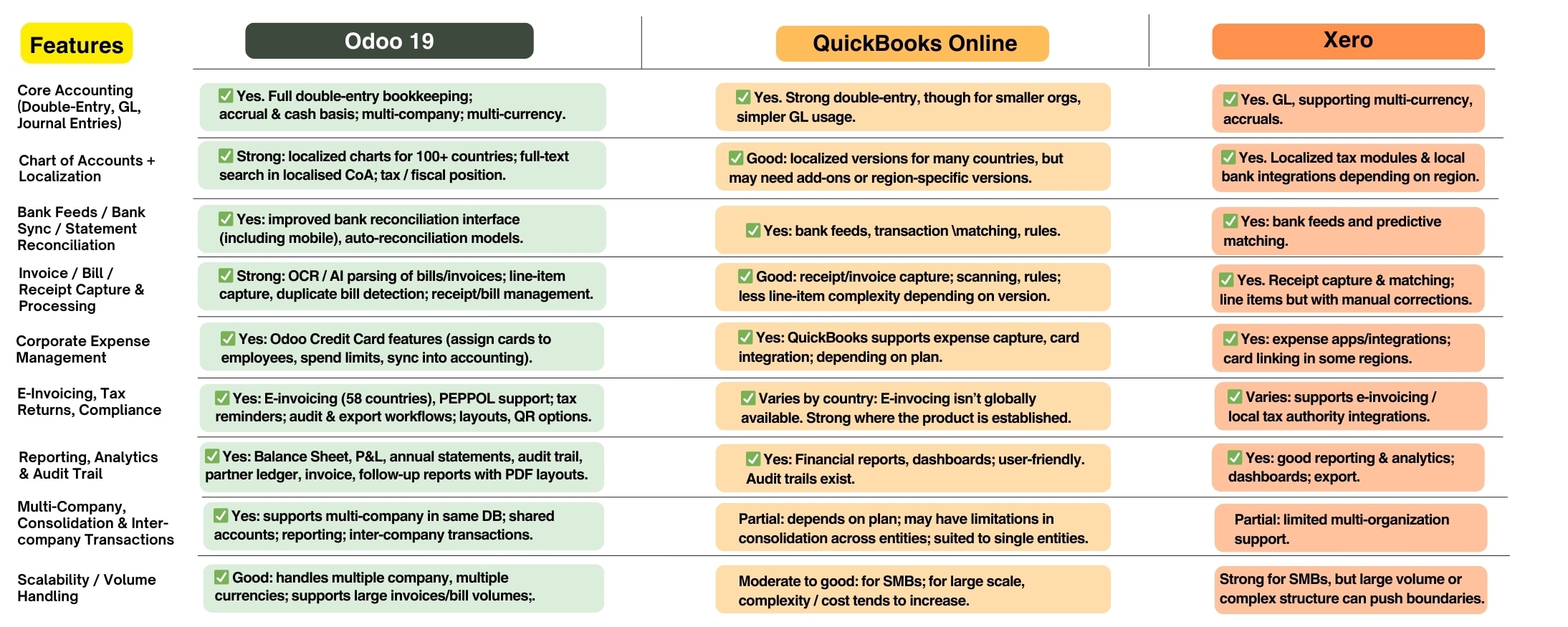
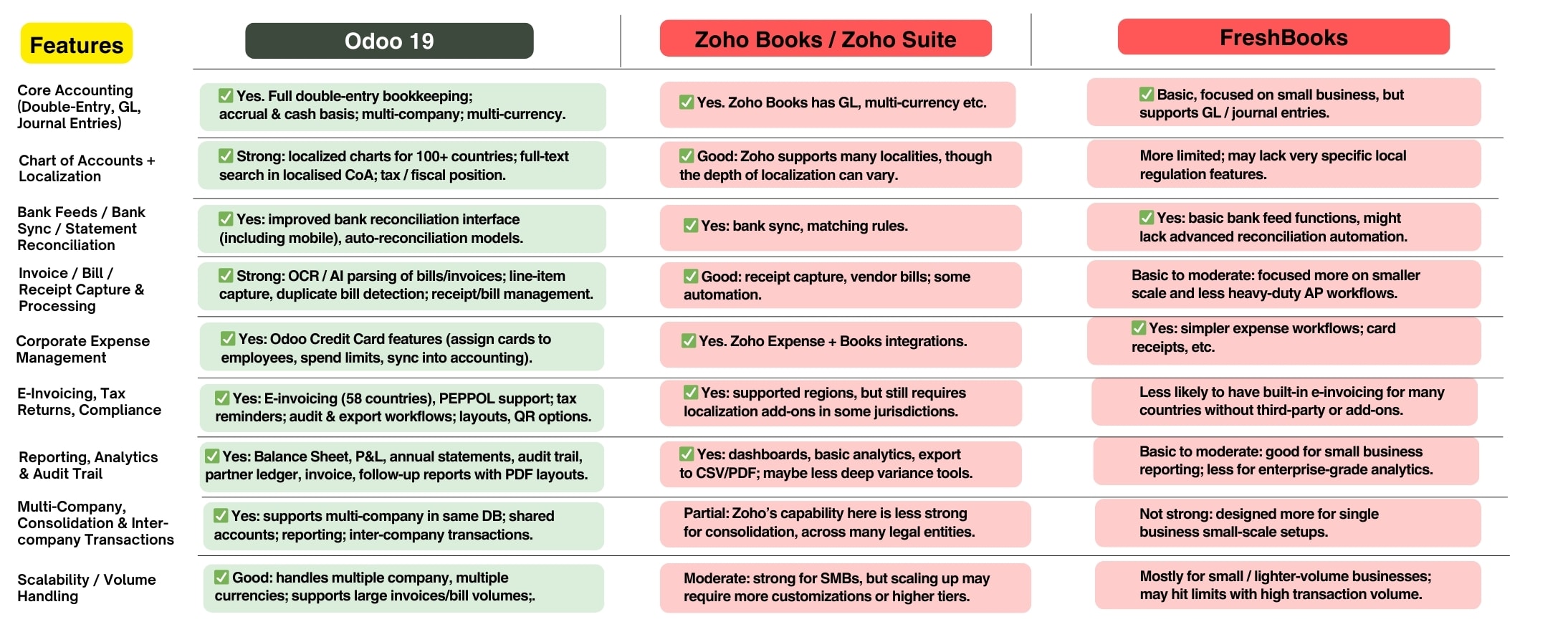
Is AI for Accounting worth it?
6% of CFOs globally say they are already investing in AI for accounting/finance (Source: Gartner).
By 2030, AI could automate up to 50% of current accounting functions (Source: McKinsey Global Institute).
Should You Prioritize AI capabilities for your Accounting Software?
Yes, if you…
- Handle high volumes of invoices, bills, or transactions where manual reconciliation is time-consuming.
- Operate in industries where compliance, fraud detection, and audit readiness are critical.
- Are scaling up from Excel / legacy systems and want to skip building manual controls from scratch.
- Have a lean finance team and want to reduce repetitive data entry so staff can focus on analysis.
Maybe not the top priority, if you…
- Run a very small business with <50 monthly transactions (manual entry may suffice).
- Already outsource bookkeeping and don’t rely heavily on in-house accounting staff.
- Are in a region with some local accounting standards which don’t require intense compliance.
AI in accounting isn’t just a “nice to have”, it’s becoming a competitive necessity. The ability to reconcile automatically, parse bills without errors, and ensure compliance with minimal human intervention can save money, reduce errors, and free up your team for decision-making.
For businesses upgrading from legacy systems or Excel, prioritizing AI features can be the difference between just digitizing and truly transforming finance operations.
Let’s take this discussion on demo call personalized for your accounting needs.