If you’re in the service business, you already know that not all tickets are born equal. Some issues can wait, while others scream “Fix me NOW!” So why treat them all the same?
That’s exactly why we rolled out a custom 4-star ticket prioritization system in Odoo to help support teams deal smarter, act faster, and never let a critical issue slip through the cracks again.
Here’s how a custom Ticket Dashboard in Odoo works (and why it might just change how your team handles tickets).
Implementing a Ticket Priority System in Odoo for Service Businesses
Your Tickets Deserve Better Priorities!
We’ve extended Odoo’s default priority field into a more intuitive, visual 4-star system:
- 1 Star: Low
- 2 Stars: Medium
- 3 Stars: High
- 4 Stars: Critical
Hover over the stars in the Odoo Kanban view or ticket form, and you’ll see the labels appear, making it super easy to spot what needs attention and what can wait.
It’s clean, clear, and gives your helpdesk team instant context.
Ticketing Priorities Integrated Where It Matters
We didn’t stop at just making it pretty. The 4-star priority is now deeply integrated into Odoo Helpdesk system, including:
- Helpdesk Tickets: Priorities visible and editable in both Kanban and form views.
- SLA Configuration: The sla model now supports these priority levels.
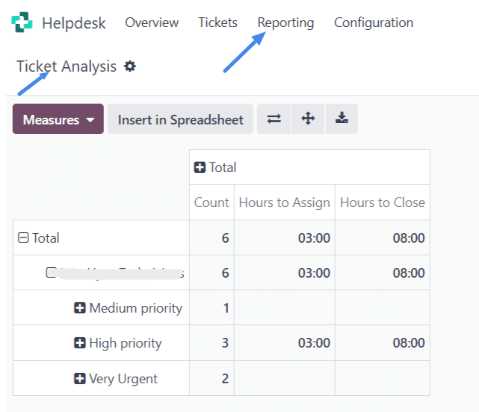
- Reports & Dashboards: All analysis tools now reflect the new star-based structure, so reporting on High vs. Critical isn’t a guessing game anymore.
Smart Workflow Controls
The new prioritization isn’t just cosmetic, it drives logic.
Trying to move a ticket to “Planned” without setting a deadline? It won’t allow you, the ticketing priority system will block that.
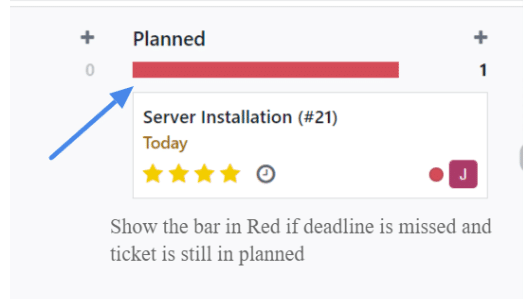
If the ticket passes its deadline in the “Planned” stage, the Kanban bar goes red, a gentle nudge that something needs your attention.
This makes ticket planning smarter and enforces accountability, all without adding complexity.
Ticket System Dashboard in Odoo: Your Command Centre
We’ve crafted a custom priority dashboard for helpdesk agents and managers, giving you an instant snapshot of what’s happening:
- Your Tickets: All tickets assigned to you.
- Critical: Tickets marked with ⭐⭐⭐⭐ along with:
- Average open hours
- Count of failed SLAs
- High Priority: All 3-star tickets.
- Medium Priority: 2-star queue.
- Low Priority: The snooze-worthy stuff.

Click any of these sections, and you’re in the standard Odoo Helpdesk Report filtered by that priority. No more hunting. No more filtering manually.
What does this mean for users?
- Visualize ticket load by priority straight from the helpdesk dashboard.
- Click on any priority block to get detailed reports.
- Automatically organize reports by priority in list views.
Basically, we’ve taken the manual effort out of prioritization and made it a seamless, smart part of your workflow.
Service-based businesses thrive on speed, accuracy, and urgency, but only when it’s warranted. This ticket priority system brings clarity, efficiency, and visibility right where your support team needs it.
Need help Implementing a Ticket Priority System within your Odoo instance? Let’s talk!
If you’re not using Odoo for Service Business, schedule a free demo session to witness the potential.