For Managed Service Providers (MSPs) and other project-driven service companies, accurate time tracking isn’t just a matter of internal efficiency; it directly affects revenue, client satisfaction, and profitability.
Technicians are assigned specific hours to resolve tickets or complete tasks, and in some cases, they often work beyond standard business hours: responding to critical support tickets, performing installations over weekends, or troubleshooting during holidays. For businesses offering services, tracking overtime hours accurately and billing them correctly is critical.
Unfortunately, many companies still rely on fragmented systems like spreadsheets, manual logs, and disconnected tools, making it difficult to capture:
- Different hourly rates based on time of service (standard hours, after-hours, weekends, holidays)
- SLAs requiring 24/7 support, demanding technician availability beyond regular schedules
- Projects involving on-site service or urgent incident handling outside working hours
- Missed revenue due to poor visibility on overtime logged but not invoiced
When these hours are not categorized or billed correctly, you either overcharge clients (damaging relationships) or undercharge (losing revenue).
For a business built on billable time, this is not a margin you can afford to overlook.
This is exactly where the custom Odoo PSA Solution for MSPs and service companies steps in as a strategic enabler.
Challenges of Not Tracking Overtime Hours vs. How Odoo Solves Them?
| Time Tracking Challenges for Service Companies | Custom Odoo Solution |
| Lost Revenue from Unbilled Hours: Without clear overtime categorization, extra hours worked after business hours or on weekends often go unbilled. | Categorized Timesheet Entries: Technicians log time as Weekly, Overtime (Weekday/Weekend), or Holiday Hours, ensuring every billable minute is captured. |
| Disputes Over Invoices: Clients challenge charges when overtime isn’t separated or justified, leading to delays or write-offs. | Transparent Billing: Odoo links timesheets to sales orders and invoices, showing exactly how rates were applied for each type of hour. |
| Manual Calculations and Errors Accounting teams spend time manually checking timesheets and applying rates, increasing the room for mistakes. | Automated Rate Application Rates for each hour type are auto-fetched from customer profiles and products, no manual effort required. |
| No Insight into Technician Utilization: When all logged hours are lumped together, managers can’t analyze team workload or overtime trends. | Smart Reporting & Dashboards: Track billable vs. non-billable hours, view overtime trends, and monitor client profitability in real time. |
| Compliance Risks Labor law or contractual obligations related to overtime may be violated if hours aren’t tracked correctly. | Structured Logs for Compliance: Odoo provides an audit trail of hours logged and billed, reducing risk during audits or client escalations. |
How custom Odoo Professional Service Automation Solution help You Track and Bill Overtime?
With Odoo for IT managed service providers, overtime tracking is deeply embedded into the timesheet, project, helpdesk, and invoicing workflows.
Here’s how it works conceptually:
1. Track Time by Hour Type
In the Odoo Timesheet view linked to project tasks or helpdesk tickets, users can select the type of hours they’re logging:
- Weekly Hours
- Overtime – Weekday
- Overtime – Weekend
- Holiday Hours

This classification allows MSPs to segregate effort based on time of delivery, making tracking more structured and billing more transparent.
Experience: Clear reporting for internal performance + accurate billing for clients.
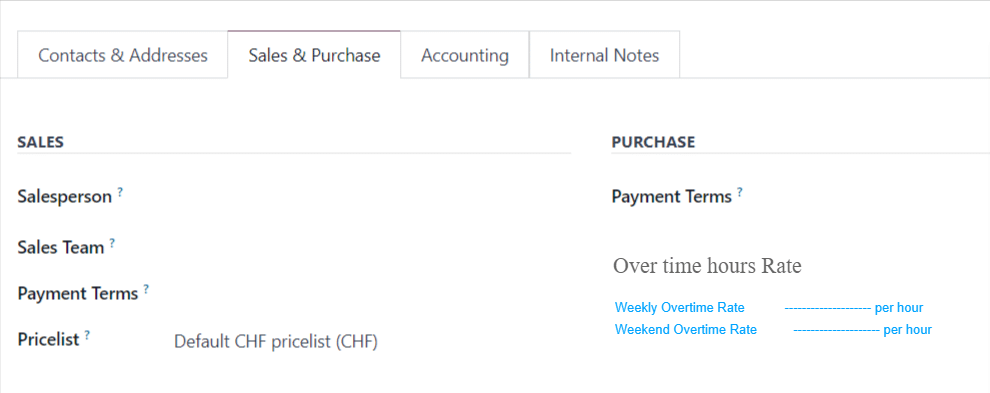
2. Configure Client-Specific Rates
Not all clients are billed equally. Some may have custom weekend or holiday rates, especially those under premium SLAs. Odoo allows you to define:
- Overtime Rates per Client (weekday/weekend/holiday)
- Standard Billing Rate per Service Product
These rates are applied automatically during validation, eliminating guesswork or manual overrides.
Experience: Fewer billing disputes, increased trust, and simplified finance workflows.
3. Auto-Sync with Sales Orders and Invoicing
When timesheets are validated, Odoo pulls together:
- Standard and overtime hours logged on tasks and tickets
- Rates are configured per customer and product
- Totals calculated automatically, reflected in the Sales Order
Invoicing becomes automated and auditable, ensuring every minute of service is accounted for.
Experience: Increased revenue capture, improved cash flow, and transparent client reporting.
Real Business Impact of Odoo for MSPs and Service Providers
With custom Odoo solution for MSPs and service companies, you gain:
- Full visibility into technician effort and utilization
- Accurate revenue forecasting from tracked overtime
- Enhanced SLA compliance and client transparency
- Standardization in project and support billing workflows
Whether you’re delivering project-based services, after-sales support, or SLA-backed IT management, the ability to track time by context and bill accordingly makes a tangible difference to your profitability.
Schedule a demo to explore the solution first-hand.