
These are the 20 questions businesses and developers are actually searching for about Odoo 20. Each answer below is grounded exclusively from official roadmap updates.
-

Odoo Light User Explained: 7 Things You Must Know!
Odoo Light User is a low-cost licence for staff who need only limited access to Odoo, such as logging their own leave and expenses, scanning stock, clocking into a POS session, or viewing a planning worksheet, rather than running core business operations. It was introduced with Odoo 20 at Odoo Experience 2026, and it changes…
Odoo 20 Expectations & Common Questions Answered
1. What are the primary new features in Odoo 20?
Odoo 20 is framed as “20 unfairly selected points” across three pillars: Simple, Efficient, Affordable. The primary confirmed feature areas are:
AI across the platform: Autonomous accounting audit agent, AI-powered website editing with image generation, AI record creation/update via natural language, and a Helpdesk AI sidebar.
Payroll overhaul: New dashboard surfacing pay-run blockers upfront, elimination of the work entries step, and a new Pay Runs view.
Point of Sale: Auto-detecting hardware via local network (no certificates), automatic combo detection, a floor plan editor, and product snooze for self-ordering.
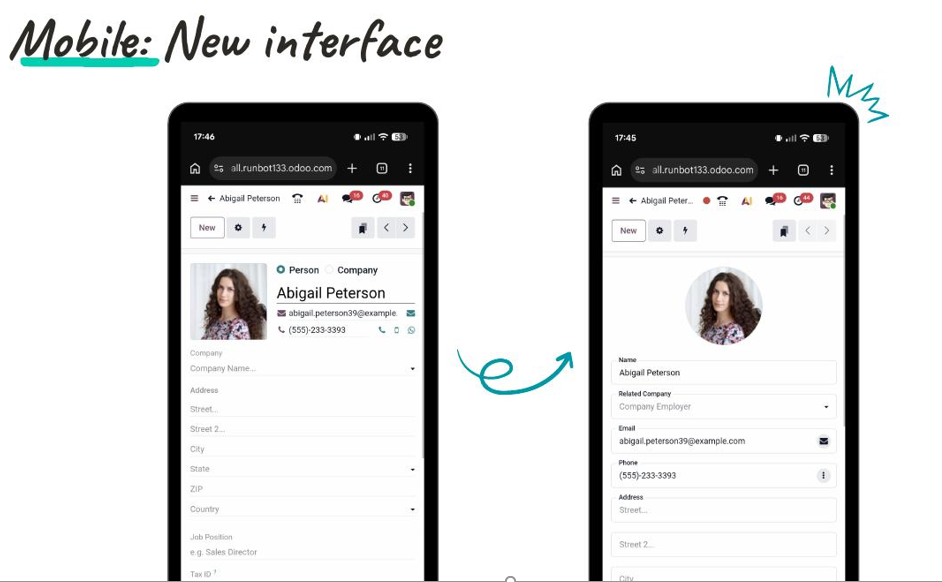
Mobile redesign: A completely new mobile interface purpose-built for phones.
Calendar: Multi-calendar management, personal booking pages, activities visible in calendar, time detection in event titles.
Sign: Automated sign requests via Activity Plans, Itsme support for 30+ countries, font support for 40+ new countries, mobile editor.
Accounting: Direct vendor payments from Odoo, tax-inclusive/exclusive toggle on documents, multiple partner IDs, reconciliation on any account, public accounting website.
Manufacturing: New MO Kanban by week, Work Order Kanban per work center, PLM ECO cost overview report.
Technical: Owl 3 (JavaScript framework upgrade), External JSON-2 API (XML-RPC enters legacy mode), in-browser PDF report editor.
2. Is it worth upgrading from V18/V19 to V20 immediately?
The roadmap itself does not address upgrade timing. However, it confirms two technical changes with direct implications:
Owl 3: Any custom module with frontend components must be ported. This is real developer work, not automatic.
XML-RPC deprecation: XML-RPC enters legacy mode in Odoo 20 and is removed in Odoo 22. Businesses with external XML-RPC integrations have a window to migrate to JSON-2, but it is finite.
If you have heavy customizations or third-party modules: wait for the first stable patch (4–6 weeks after September 2026 launch).
CAUTION!
If you’re on v19 with light customization: a Q1–Q2 2027 upgrade is manageable. If you’re on v17 or v18 with significant custom code: the v20 delta is larger than usual due to Owl 3 — consider getting to v19 first.
3. How will Odoo 20 improve its AI integration?
The roadmap shows AI embedded as a functional participant across four specific areas, not a chatbot layer, but a system that executes tasks.
Few Odoo AI Features include:
Accounting AI agent: Runs a quarterly audit checklist autonomously, including bank statement review, reconciliation checks, and anomaly detection. No human prompt required per step.
AI Create/Update: Three confirmed capabilities- reassign leads via natural language, create a full project with stages and tasks from a PDF document, and query operational data across modules in real time.
AI Website Assistant: Accepts multi-step instructions in one prompt and applies all edits at once. Generates contextually appropriate images on demand.
AI Helpdesk sidebar: On every ticket- summarizes chatter, drafts a follow-up answer, and finds solutions from similar past tickets.
4. Are there significant user interface (UI/UX) changes?
Yes, there are several confirmed UI changes, not cosmetic tweaks:
Mobile interface: Completely redesigned mobile form view- purpose-built for phones with visible field labels, reduced white space, no horizontal scrolling, proper touch targets.
Calendar: Rebuilt calendar sidebar with multi-calendar management, personal booking pages, colleague calendar visibility, and time detection in event titles.
Payroll dashboard: New dashboard-first experience surfacing pay-run blockers as actionable items before the run starts.
POS floor plan editor: New drag-and-drop floor plan editor with multiple table shapes, background images, and color-coded sections.
Manufacturing Kanban views: Two new Kanban views- MOs grouped by week with capacity indicators, and Work Orders per work center with one-click planning updates.
TL;DR
Mobile, Payroll, Calendar, POS, and Manufacturing all receive meaningful interface redesigns confirmed in the deck.
5. How does the pricing structure change for Odoo 20?
The roadmap’s positioning shows the same message- “All your business on one platform. Simple, efficient, yet affordable.” The price shown is €19.90/month for ALL apps.
Odoo updated its Enterprise T&Cs to allow up to 7% annual renewal fee increases. Review the current Enterprise agreement directly with Odoo or your partner if pricing stability matters to your planning.
6. Does Odoo 20 require a change in infrastructure or hosting?
The roadmap does not specify any new infrastructure or hosting requirements for Odoo 20. There are no hints addressing server specs, minimum hosting changes, or cloud migration requirements.
The confirmed technical changes are Owl 3 (JavaScript framework) and the External JSON-2 API. These are code-level changes, not infrastructure changes.
7. What improvements are made to the mobile app functionality?
The roadmap shows one significant confirmed change: a completely redesigned mobile interface.
Before: Standard Odoo desktop form view compressed onto a phone screen- small text, cramped fields, no space between elements.
After: Purpose-built mobile view with prominent avatar display, fields with clear labels and visible separators, clean typography sized for touch, no horizontal scrolling.
8. Does Odoo 20 offer better integration with third-party tools?
Yes, better native payment coverage globally, a new phone integration, and a cleaner external API. Third-party integration philosophy is “replace, not integrate”, but JSON-2 supports those who still need external connections.
Payments and marketplaces: New marketplace integrations- TikTok and Lazada, plus a marketplace engine for custom connectors. New payment providers: ECPay (Taiwan), Xendit (Singapore), PayWay (Cambodia), QF Pay, Belvo, Kueski (LATAM). Additional tokenization and manual capture features.
Phone system: Buy phone numbers in 100+ countries directly from Odoo and configure call routing via a visual drag-and-drop callflow builder, integrating telephony natively.
External JSON-2 API: The new JSON-2 API replaces XML-RPC as the standard external integration method. Cleaner and more capable. XML-RPC remains in legacy mode in v20, removed in v22.
9. What improvements are made to the Accounting module?
1. Pay directly from Odoo: Select vendor payments in batch → click Pay Now → authenticate with a single digital signature → batch sent directly to the bank. Or generate SEPA XML for manual upload. Eliminates the export/re-upload cycle.
2. Public Accounting Website: A public reference website showing each country’s localized chart of accounts, tax rates, and expense deductibility rules, searchable without logging in.
3. Prices included or excluded: Define tax-inclusive or tax-exclusive pricing per product, and switch between the two dynamically on individual documents without changing the product setting globally.
4. Multiple partner IDs: Store multiple identification numbers per partner — VAT number, Company Registry, LEI code with format validation per type.
5. Reconciliation on any account: Any general ledger account can now be reconciled, with automatic adjustment entries generated for FX differences or revenue deferral scenarios.
10. How does Odoo 20 improve CRM lead tracking?
Multi-pipeline management: Teams managing separate sales processes can now maintain multiple pipelines natively within a single Odoo instance. Previously required workarounds.
New mail plugins: Updated plugins for Gmail and Outlook connecting email directly to CRM records.
New auto-assignment: Improved rules for automatically assigning incoming leads and opportunities to the right salesperson or team.
Additionally, the AI Create/Update feature (slide 27) has direct CRM relevance: natural language lead reassignment working live across the database.
11. Are there new features for automating supply chain / inventory in Odoo 20?
Simplified stock model: A new “built-in” stock approach with a single general On Hand quantity per product, manually updatable. When a delivery is completed, update the delivered quantity. Designed for businesses that track stock but don’t need full warehouse routing rules.
Operational improvements:
- redesigned product and lot labels
- perpetual inventory valuation improvements
- inter-company and inter-branch improvements
- allocation report improvement
- CMR document support
- push routes based on stock move line locations
- putaway rules improvements
- batches/waves improvements
- Pre-encoded packages for receipts scannable in barcode
12. How does the eCommerce website editor improve in Odoo 20 version?
AI Website Assistant: The biggest website change. A conversational AI assistant accepts multi-step editing instructions in a single prompt and applies all at once. It also generates images from a text description and places them directly on the page.
eCommerce improvements: Automated cross-sell recommendations, standalone catalog pages, customer-initiated return management from the portal, an eCommerce dashboard, rating request flows, and a promotion progress bar.
Website UI and SEO improvements: Performance improvements (reduced loading time and assets loading time), SEO features (attributes on links, image srcset, hierarchy on pages, Microdata/JSON-LD, improved Redirect tool, fixed no-index and canonical URL issues), UI improvements (revamped themes, Blog UI revamp, improved search bar with highlight and fuzzy search, accessibility improvements, editor table layout options and cell merge).
13. Are there better native integrations for international shipping / taxes?
Tax side: Multiple partner IDs (slide 81) allow storing VAT numbers, company registry numbers, and LEI codes per partner with validation, directly relevant to multi-jurisdiction compliance. Tax-inclusive/exclusive price toggle (slide 80) is relevant to selling in markets with different tax display requirements. Public Accounting Website (slide 79) shows tax rates and deductibility rules per country.
Payments: New regional payment providers in Taiwan, Singapore, Cambodia, and Latin America.
CMR document: CMR is the standard consignment note for international road freight, confirmed as a new inventory addition, meaningful for European businesses shipping cross-border.
15. Does Odoo 20 enhance multi-company management?
Inter-company / inter-branches improvements: Listed explicitly in the inventory improvements as a confirmed change.
Payroll Pay Runs: The Pay Runs view shows company context and employee records in a structured multi-company-aware layout.
16. What changes exist in the Odoo framework (Python / JavaScript)?
Owl 3- JavaScript framework: Odoo’s frontend JavaScript framework upgrades to Owl 3. The slide shows the version name and a link to odoo.github.io/owl/. Developers should review the Owl 3 changelog at that URL for specific API changes vs Owl 2.
External JSON-2 API: The new JSON-2 API is confirmed as Odoo 20’s external integration standard, with documentation at odoo.com/documentation/19.0/developer/reference/external_api.html. XML-RPC enters legacy mode in v20 and is removed in v22.
17. How does Odoo 20 improve the module development process?
In-browser PDF report editor: Edit QWeb report templates with a live preview directly in the browser, no development environment needed for report customization. Complex report logic still requires developer access.
Owl 3: Upgrade to Owl 3 brings frontend framework improvements. Developers building frontend-heavy modules must port to Owl 3 APIs, but benefit from the improved framework going forward.
JSON-2 API: Cleaner, more capable external API for module integrations and external system connections.
18. Are there enhancements to the API and data import tools in V20?
External JSON-2 API: JSON-2 replaces XML-RPC as the standard external API. It is more structured and modern than XML-RPC. The documentation is available at the Odoo developer reference. XML-RPC remains accessible in legacy mode through Odoo 21.
=ODOO.LIST formula in Spreadsheets: The new formula pulls live Odoo data into a native Odoo spreadsheet as a dynamic list always current. Select the Odoo model, choose columns, and the spreadsheet populates and refreshes automatically. Reduces manual export/import cycles for reporting.
19. How does Odoo 20 improve server performance?
Website performance: The website improvements slide explicitly lists “Performance: reduce loading time and assets loading time” as a confirmed improvement. No specific metrics are given.
POS RAM reduction (POS general improvements): The POS section confirms “Performance: the POS uses less RAM in the browser” as a specific improvement. No specific numbers are given.
20. What is the new recommended approach for customization in Odoo 20?
- Port all existing Owl 2 frontend components to Owl 3.
- Migrate any XML-RPC integrations to JSON-2 before Odoo 22.
- Use the in-browser report editor for report changes where possible. 4. For new backend logic, Python-level customization via standard Odoo module structure remains the approach, the deck confirms no change to this.
Every answer above is sourced from the official Odoo 20 Roadmap presentation by Luc Nailis, Odoo Product Owner.
The official confirmed feature set will be published at Odoo Experience 2026, September 24–26, Brussels.