The way to reduce plywood waste is to plan the cutting layout before cutting, not while cutting. A cut list optimizer works out how to fit every part of a job onto the available sheets so fewer sheets are used and less board is thrown away.
With Cut List Optimizer in Odoo– the parts, the sheets, and the cutting layout all sit in the same system as the orders and the stock. For a furniture maker that matters, because on most jobs the board is the biggest cost.
What Is a Cut List Optimizer?
A cut list optimizer arranges all the parts of a job onto sheets of plywood, MDF, or melamine so the least possible material is wasted, and it shows the layout before anyone touches the saw. It is also called panel cutting software or a sheet cutting optimizer.
How Does a Cut List Optimizer Work in Odoo?
If you cut sheet ply, metal, panels, or flat stock, you already know the real cost of manufacturing isn’t just labor or machine time, it’s the material you throw away.
A few percentage points of wasted plywood on every job adds up fast, and most shops are still nesting parts onto stock sheets using spreadsheets, gut feel, or standalone nesting software that has nothing to do with the rest of their operations.
Aktiv Software built Cut List Optimizer, a nesting module inside Odoo, to close that gap. It takes your panel list and your available stock sheets and calculates the cutting layout that wastes the least material without forcing your team to jump between a separate nesting tool and your ERP.
It takes the parts, the sheets, and a few cutting rules, and returns the layout. Because it is built into Odoo, none of that data has to be re-entered anywhere.
Which Parts Go Into the Cut List?
Every part in the job: length, width, quantity, and a name. A kitchen job might carry thirty different part sizes, and they all go into the cut list.
Which Plywood Sheets and Offcuts Are Available to Cut From?
Whatever board is on hand. Full sheets, and any usable offcut inventory worth cutting into. Each one is entered with its size and quantity, so the optimizer can place parts on an offcut before opening a fresh sheet.
What Rules Should the Cutting Layout Follow?
Four settings shape the layout, and each one changes the waste figure.
- Kerf, or saw blade thickness. Every cut turns a few millimetres of board into sawdust. Counting it means the cutting layout matches what really happens at the saw.
- Grain direction. Doors and tops must run with the grain and cannot be turned sideways to fit. Backs and shelves usually can. Enforcing grain on every part typically adds 5 to 15 percent waste, so it pays to set it only where the part is visible.
- Labels on the layout. Each piece is printed with its name on the diagram, so the operator knows what is what.
- Single sheet only. Force the whole job onto one sheet where it will fit.
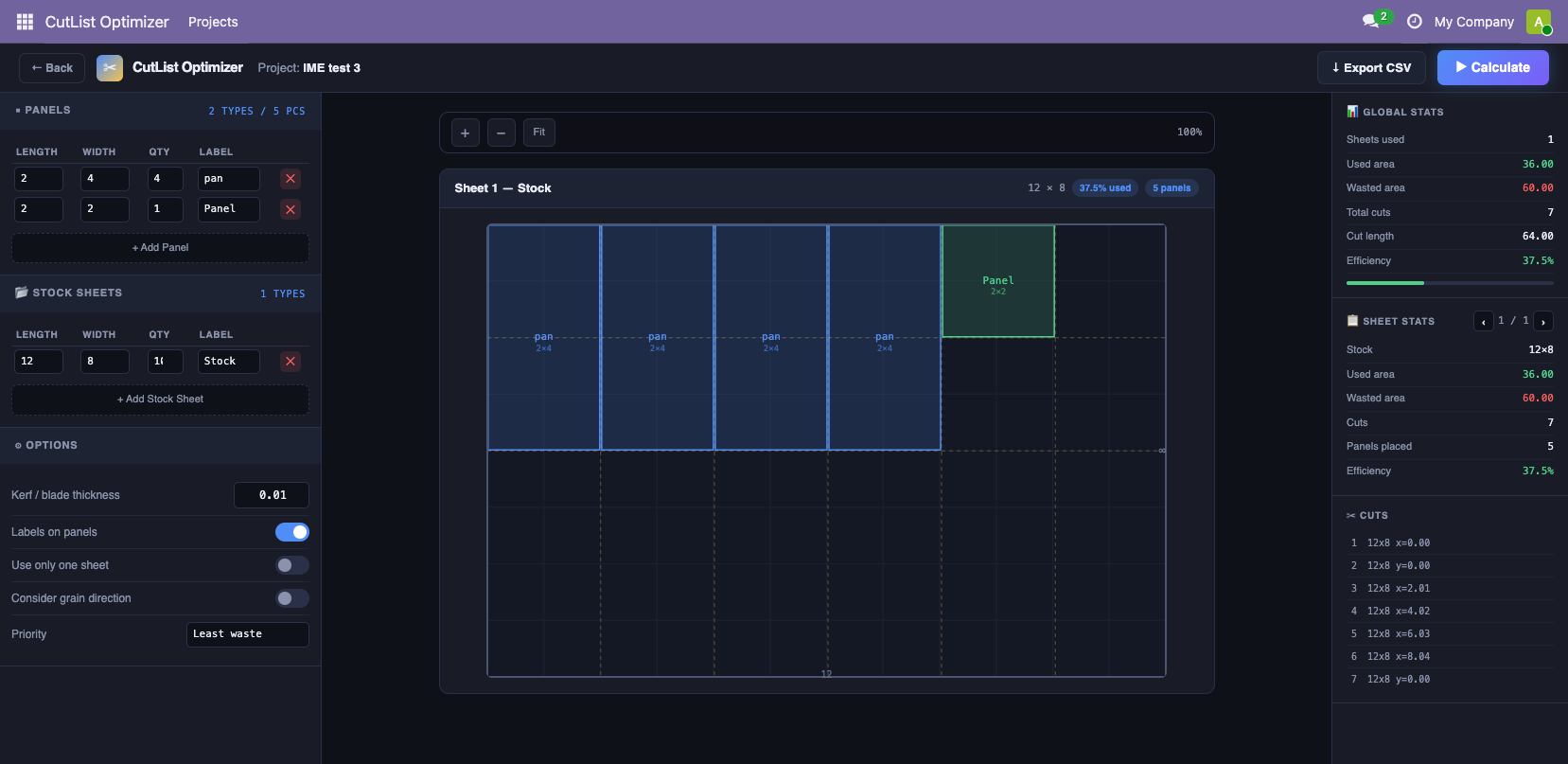
What Does the Cutting Layout Show?
A picture of every sheet, plus the numbers. For the whole job: sheets needed, board used, board wasted, number of cuts, and an efficiency percentage. For each individual sheet: the same figures, plus a full cut list with exact positions.
That per-sheet view matters more than people expect.
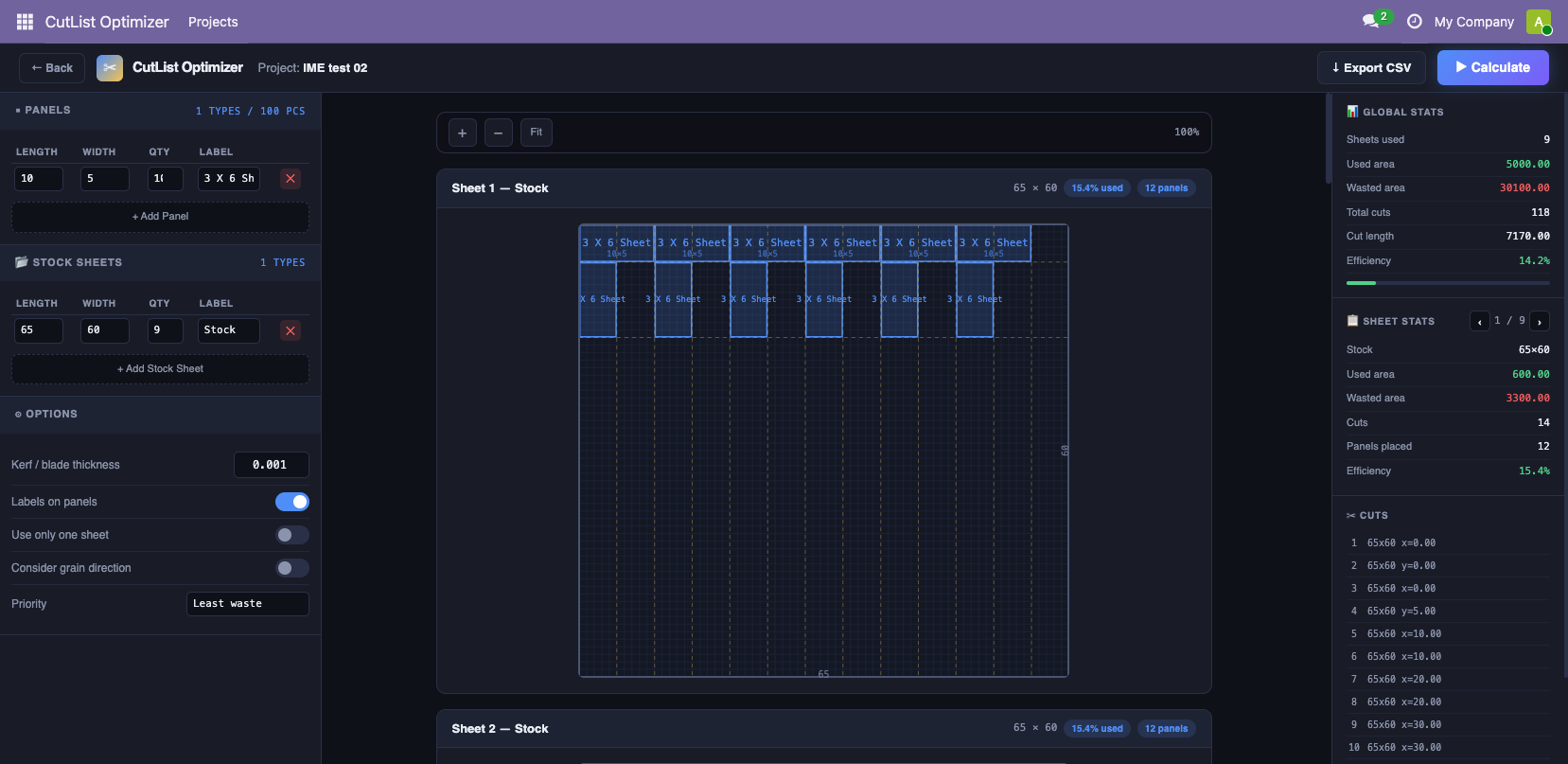
A job can look acceptable on average while one sheet is badly wasted because of an awkward mix of parts. Every job is saved in Odoo with its waste figure, so a production manager can scan the list and see which jobs are eating board.
How Does the Cutting Layout Reach the Panel Saw or CNC?
The module produces a CSV cut list with every part, the sheet it comes from, and where on that sheet to cut it, ready for the CNC, the beam saw, or a printed sheet on the shop floor.
Because the optimizer lives inside Odoo, the parts can come straight from the sales order or the bill of materials, the board consumed ties back to stock, and the waste percentage becomes a real cost on the job rather than a number stuck in a tool nobody outside the workshop opens.
What Does a Cut List Optimizer Save on a Real Furniture Job?
- Material cost is often the single largest line item in furniture manufacturing- a 5–10% improvement in nesting efficiency has a direct, compounding effect on margin across every job.
- CNC and laser cutting time is expensive. Fewer cuts and tighter layouts reduce both material waste and machine time.
- Quoting accuracy improves when the actual material required for a job is known before production, not estimated.
- Shop floor errors drop when cutting instructions come from the same system as the order, with labels and coordinates baked in, not a hand-copied spreadsheet.
Example: Take a run of five base cabinets. Each needs two sides, a bottom, and a shelf: twenty parts in four sizes, cut from standard 8 by 4 plywood.
Cut them in the order they appear on the list and every sheet ends up with an odd strip down one side, too narrow for the next part. The job burns through more board than it should.
Run the optimizer and it interlocks the sides, bottoms, and shelves so the leftover strip is as small as possible. It shows the layout for each sheet, says the job needs four sheets rather than five, and gives the efficiency before a single cut is made. If one sheet comes back half empty, the mix can change, another cabinet can join the run, or the waste can be accepted knowingly.
One sheet saved, on one job. On a full kitchen of forty-plus parts, cutting waste from 18 percent down to 10 percent saves one to two sheets outright.
Why Run a Cut List Optimizer Inside Odoo Instead of a Standalone Tool?
Because a standalone cut list optimizer solves the geometry and leaves the business problem untouched.
Plenty of good sheet cutting optimizers exist. None of them know what the customer ordered, what board is actually in stock, or what the job costs.
Someone still re-keys the part list in, and re-keys the material used back out. The waste percentage never reaches the quote or the job cost.
Inside Odoo, the cutting layout, the board it draws from, and the order it belongs to are one record. That is why this is a custom module rather than an off-the-shelf tool: standard ERPs do not plan cuts, and cutting tools do not run a business.
Want to See the Plywood Waste Before Cutting?
Waste is not measured at the end of a job. It is decided the moment the cutting layout is planned. If layouts are still worked out outside Odoo, the board thrown away this year was already decided at the saw.
Considering a cut list optimizer built into your furniture business?
Frequently Asked Questions
How do you reduce plywood waste when cutting furniture parts?
Plan the cutting layout before cutting. A cut list optimizer fits every part of the job onto the sheets so fewer sheets are used, and it shows the waste figure before any board is cut.
What is the best way to cut plywood with the least waste?
Interlock the parts instead of cutting them in list order, allow for the saw blade kerf, and enforce grain direction only on visible parts. A cut list optimizer does all three automatically.
Can offcuts be used in the cutting layout?
Yes. Usable offcuts are entered as available stock alongside full sheets, and the optimizer will place parts on them before opening a new sheet.
Is a cut list optimizer standard in Odoo?
No. It is a custom Odoo module built by Aktiv Software, running as a native app so the cutting layout connects to inventory, sales, and manufacturing.